
As an Amazon Associate, Buyiox earns from qualifying purchases made through links on this page, at no extra cost to you. This helps us keep testing home office gear and publishing honest guides.
6 Best Laptop Stands for a Healthier, Cooler Home Office
Your neck hurts by mid-afternoon. Your shoulders creep up toward your ears. And by the end of the day, you catch yourself hunched over your laptop like a question mark. Sound familiar? The problem is probably not your chair or your willpower. It is the height of your screen.
A laptop flat on a desk forces you to look down all day. That downward tilt loads your neck, rounds your shoulders, and quietly ruins your posture hour after hour. A laptop stand fixes the geometry: it lifts the screen to eye level so your head sits upright instead of drooping forward. The US Occupational Safety and Health Administration recommends that the top of your monitor sit at or slightly below eye level, with the center of the screen roughly 15 to 20 degrees below your horizontal line of sight. A good stand is the cheapest way to get a laptop screen there.
But not every stand suits every desk. A fixed aluminum riser is perfect for a permanent home office and useless for a backpack. A featherweight travel stand is brilliant in a coffee shop and pointless if your laptop never leaves your desk. So instead of six near-identical risers, we picked six stands for six real situations: the permanent desk, the sit-to-stand setup, the tight budget, the big laptop, the road, and the clamshell monitor setup. Prices are approximate and change often, so check the live price on Amazon before you buy.
One honest warning before we start: a stand only fixes your neck if you also use an external keyboard and mouse. Raising the laptop raises its keyboard too, and typing with your hands up at chin height trades neck strain for wrist and shoulder strain. Budget for a basic external keyboard if you do not already own one. With that pairing, a stand is the single best-value ergonomic upgrade you can buy.
The 6 best laptop stands, matched to fixed desks, standing desks and travel.
The 6 Best Laptop Stands at a Glance
- Rain Design mStand – best overall for a permanent desk
- Nulaxy C5 – best adjustable sit-to-stand stand
- SOUNDANCE LS1 – best budget fixed riser
- Lamicall Adjustable Laptop Stand – best for large laptops and shared desks
- Roost V3 – best portable stand for travel
- Twelve South BookArc Flex – best vertical stand for clamshell monitor setups
Our Top Picks, Reviewed
1. Rain Design mStand – Best Overall for a Permanent Desk
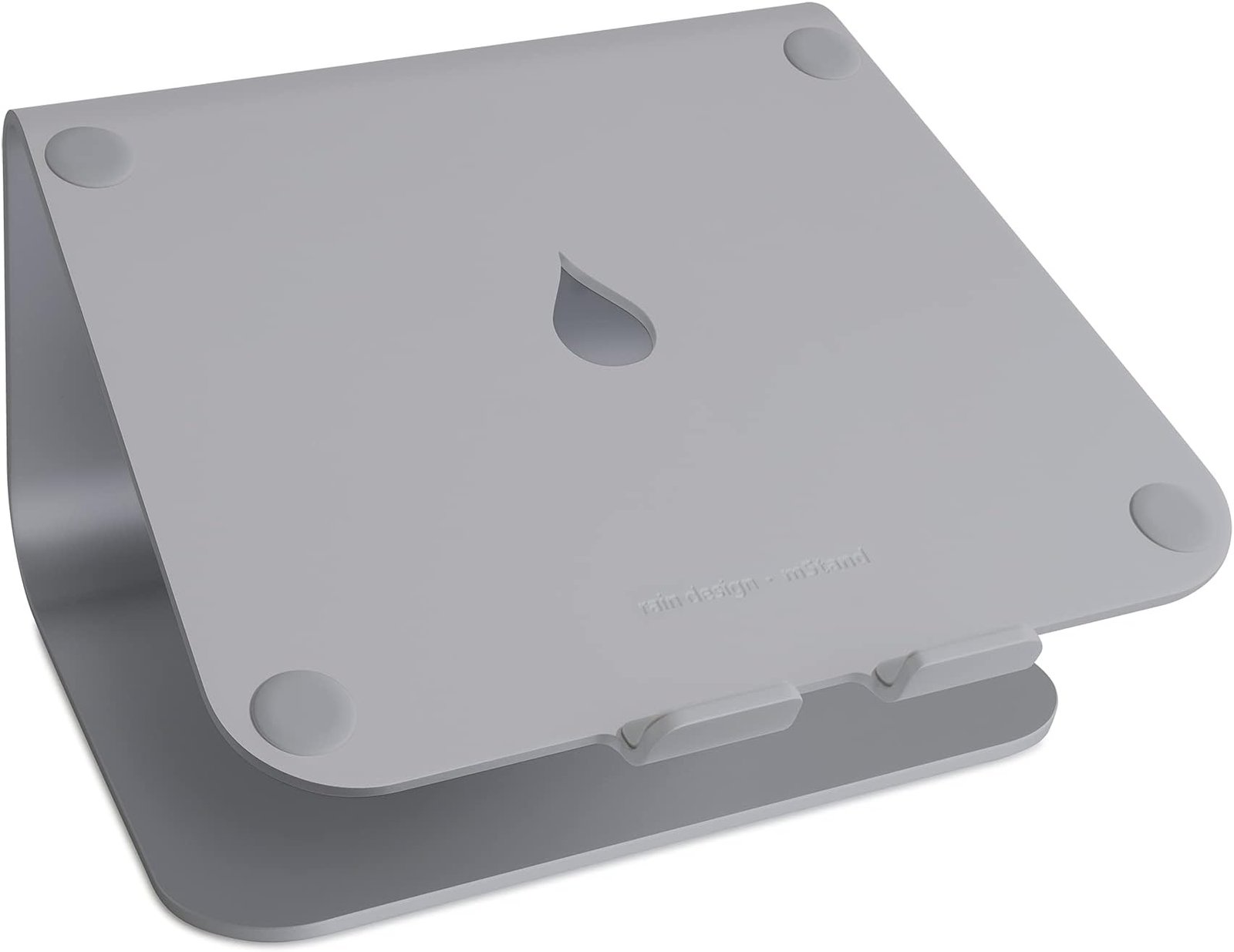
Rain Design mStand laptop stand
If your laptop lives on one desk and rarely moves, stop searching. The Rain Design mStand has been the benchmark premium laptop stand for well over a decade, and it is still the one other stands get compared to. It is a single piece of thick anodized aluminum with no hinges, no screws, and no plastic parts to wear out. You unbox it, set your laptop on it, and forget about it for years.
The mStand raises your screen 5.9 inches, which puts the top of the screen near eye level for most seated adults. The aluminum panel doubles as a heat sink, drawing warmth away from the laptop, and the raindrop-shaped hole in the back routes cables neatly out of sight. The space underneath is exactly keyboard-sized, so your external keyboard slides away under it when you finish work. It weighs about 3 lbs, measures 10 by 7.5 inches, and holds laptops up to about 17 inches, though the maker notes PC laptops should be no deeper than 10.4 inches.
The tradeoff is total inflexibility. The height is fixed, so if you are very tall, very short, or share the desk with someone of a different height, you cannot adjust it. It is also heavy and not meant for travel. But for a set-and-forget desk fixture, nothing here is more solid or longer lasting. At around $50, it is a buy-once purchase.
Pros:
- Single-piece aluminum build with zero moving parts to break
- Rock-solid stability, even under heavy 17-inch laptops
- Aluminum panel acts as a passive heat sink for cooling
- Built-in cable hole keeps the desk tidy
- Keyboard-sized space underneath for storage
Cons:
- Fixed height – no adjustment for different users or postures
- Heavy at about 3 lbs, not portable
- Premium price for a stand with no moving parts
Best for: A permanent home office desk where the laptop stays put.
Who should avoid it: Anyone who travels with their laptop, shares a desk with a much taller or shorter person, or needs sit-to-stand height changes.
2. Nulaxy C5 – Best Adjustable Sit-to-Stand Stand
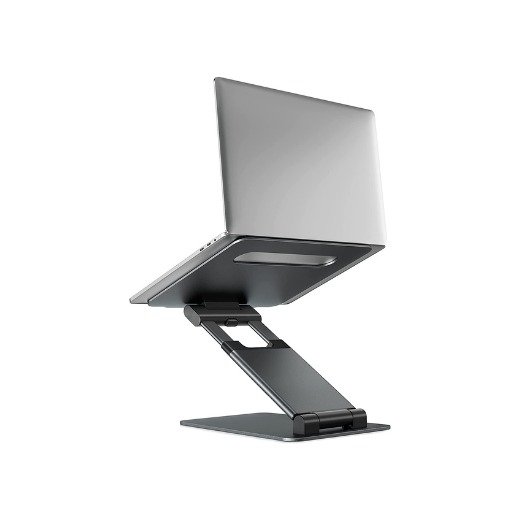
Nulaxy C5 height adjustable laptop stand
The Nulaxy C5 is the answer to the mStand’s one weakness: adjustability. This is a telescoping aluminum stand that raises your laptop screen from about 1.18 inches all the way up to 21 inches. That range covers seated work, tall chairs, and even standing at a regular desk, which makes it the most versatile stand on this list. A pull handle lets you switch between sitting and standing height in seconds.
It fits laptops from 10 to 17 inches and supports up to 22 lbs, so even a heavy gaming laptop is well within its limits. The aluminum panel has a ventilation hole for airflow, rubber pads protect your laptop and desk, and the whole thing folds down for storage or transport. The official Nulaxy product page lists it at $59.99, while deal coverage has shown it closer to $47.59 on sale, so around $50 is a fair expectation.
Being honest: a telescoping column will never feel quite as rock-solid as a single block of aluminum, and at maximum height you should avoid hammering away on the laptop’s own keyboard. Use an external keyboard, as with every stand here, and the C5 is superb. If your household shares one desk, or you switch between sitting and standing through the day, this is the pick.
Pros:
- Huge height range, about 1.18 to 21 inches, covers sitting and standing
- Pull-handle design switches sit-to-stand in seconds
- Supports up to 22 lbs and fits 10 to 17 inch laptops
- Folds down for storage and transport
- Ventilation hole and aluminum panel help cooling
Cons:
- Less rock-solid at full height than a fixed aluminum block
- Not as elegant-looking as the mStand on a premium desk
- Heavier and bulkier than a simple fixed riser
Best for: Shared desks, sit-to-stand workers, and anyone whose ideal height changes through the day.
Who should avoid it: Minimalists who want one beautiful fixed object, or travelers who need something featherweight.
3. SOUNDANCE LS1 – Best Budget Fixed Riser
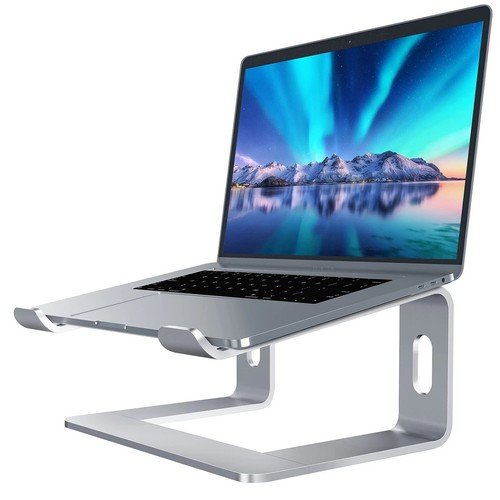
SOUNDANCE LS1 laptop stand
You do not need to spend $50 to fix your neck. The SOUNDANCE LS1 is a simple fixed aluminum riser that does the core job, lifting your screen 6 inches to near eye level, for around $33. It is made from 5 mm thickened aluminum alloy, so despite the low price it does not flex or wobble under a normal laptop. Rubber pads on the base and the laptop rests keep everything planted and scratch-free.
The open frame design is a genuine advantage: air flows freely underneath the laptop, which helps with cooling during long sessions, and the space beneath fits a keyboard when you are done. It fits laptops from 10 to 15.6 inches and supports up to 8.8 lbs, which covers nearly every ultrabook and mainstream laptop, though very heavy 17-inch gaming machines are beyond its rating. Assembly is a tool-free 3-piece job that takes seconds.
The limits are clear and fair at this price. The height is fixed at 6 inches, so taller users may still want a bit more lift, and the weight limit rules out the heaviest laptops. But with a large base of Amazon reviews averaging around 4.7 stars, this is the safest budget recommendation in the laptop stand world. If you are trying a stand for the first time, start here.
Pros:
- Around $33 – the best value fixed riser here
- 5 mm aluminum alloy frame feels far more premium than the price
- Open frame improves airflow and cooling
- Tool-free assembly in seconds, detachable for storage
- Keyboard fits underneath when work is done
Cons:
- Fixed 6-inch height with no adjustment
- 8.8 lb weight limit excludes heavy gaming laptops
- Max laptop size 15.6 inches, not 17 inches
Best for: First-time stand buyers, students, and budget home offices.
Who should avoid it: Owners of heavy 17-inch laptops, or anyone who needs adjustable or standing height.
4. Lamicall Adjustable Laptop Stand – Best for Large Laptops and Shared Desks
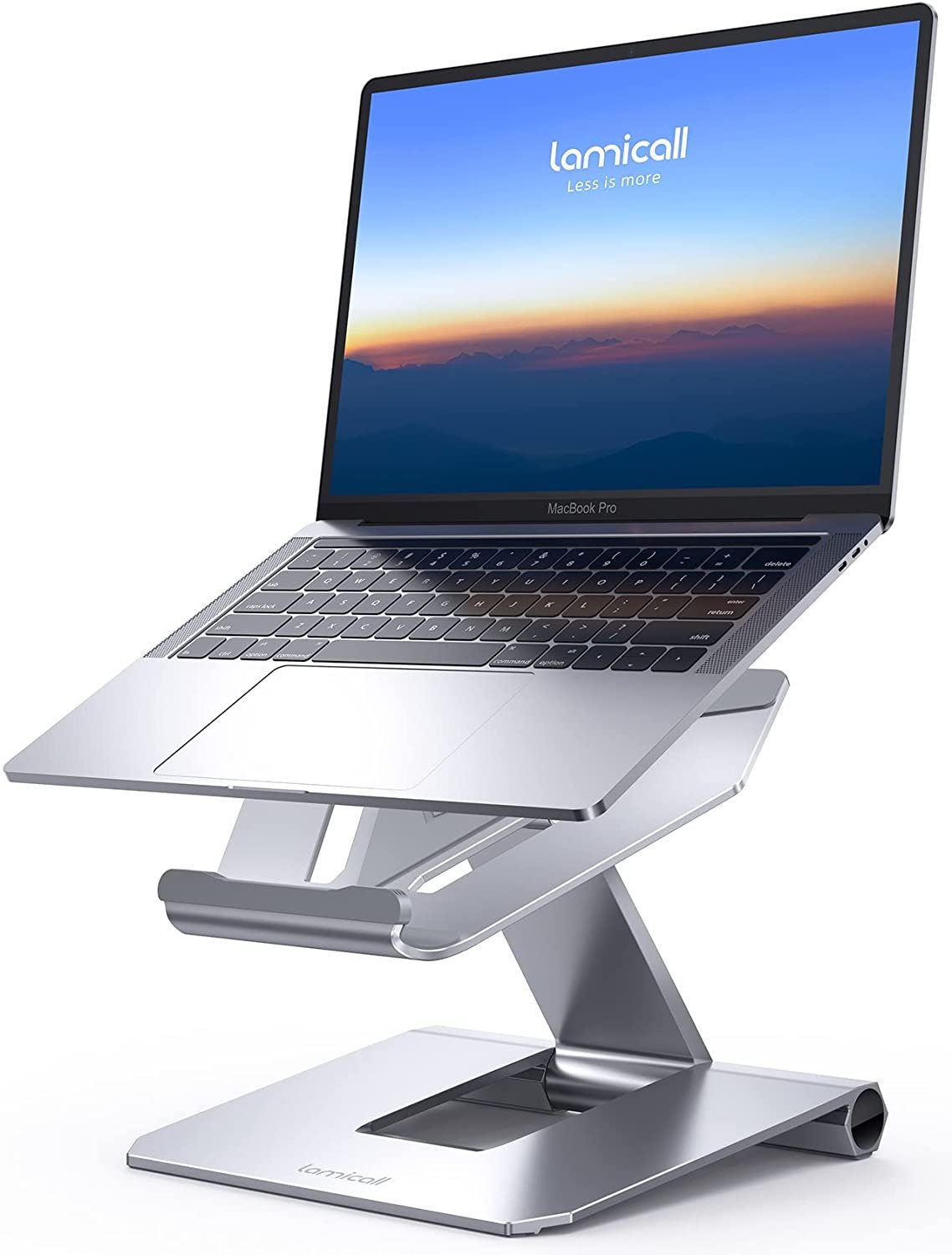
Lamicall adjustable laptop stand
Big laptops break cheap stands. The Lamicall Adjustable Laptop Stand is built for the other end of the spectrum: it fits laptops from 10 all the way up to 17.3 inches, including heavy gaming machines, thanks to a larger, heavier aluminum base that keeps the whole setup planted. If your laptop is a 17-inch workstation, this is the affordable adjustable stand to look at first.
It folds flat for travel and adjusts to multiple heights and angles, so two people of different heights can share one desk without a fixed riser forcing a compromise. Ventilation holes in the platform improve airflow, anti-skid silicone pads protect the laptop and desk, and the aluminum build dissipates heat better than plastic alternatives. It sells for around $35, which is remarkable for the size range it covers.
Review roundups consistently note the same two quirks: the hinges are stiff, and you need to lift the laptop off the stand to change the height. That stiffness is also why it holds heavy laptops without sagging, so treat it as a set-it-and-leave-it adjustment rather than something you tweak mid-meeting. A 360-degree rotating-base variant exists under the same brand name, so check the listing photos to make sure you are buying the foldable adjustable model described here.
Pros:
- Fits laptops up to 17.3 inches, including heavy gaming laptops
- Larger, heavier base gives excellent stability for big machines
- Adjustable height and angle for shared desks
- Folds flat for travel and storage
- Around $35 – strong value for the size range
Cons:
- Stiff hinges – you must remove the laptop to adjust height
- Some wobble if you type hard directly on the laptop keyboard
- Easy to confuse with the rotating-base variant under the same brand
Best for: Large-laptop owners and households sharing one desk.
Who should avoid it: People who adjust height constantly through the day, or travelers who want the lightest possible stand.

Adjustable stands let you match the screen height to your eye level.
5. Roost V3 – Best Portable Stand for Travel
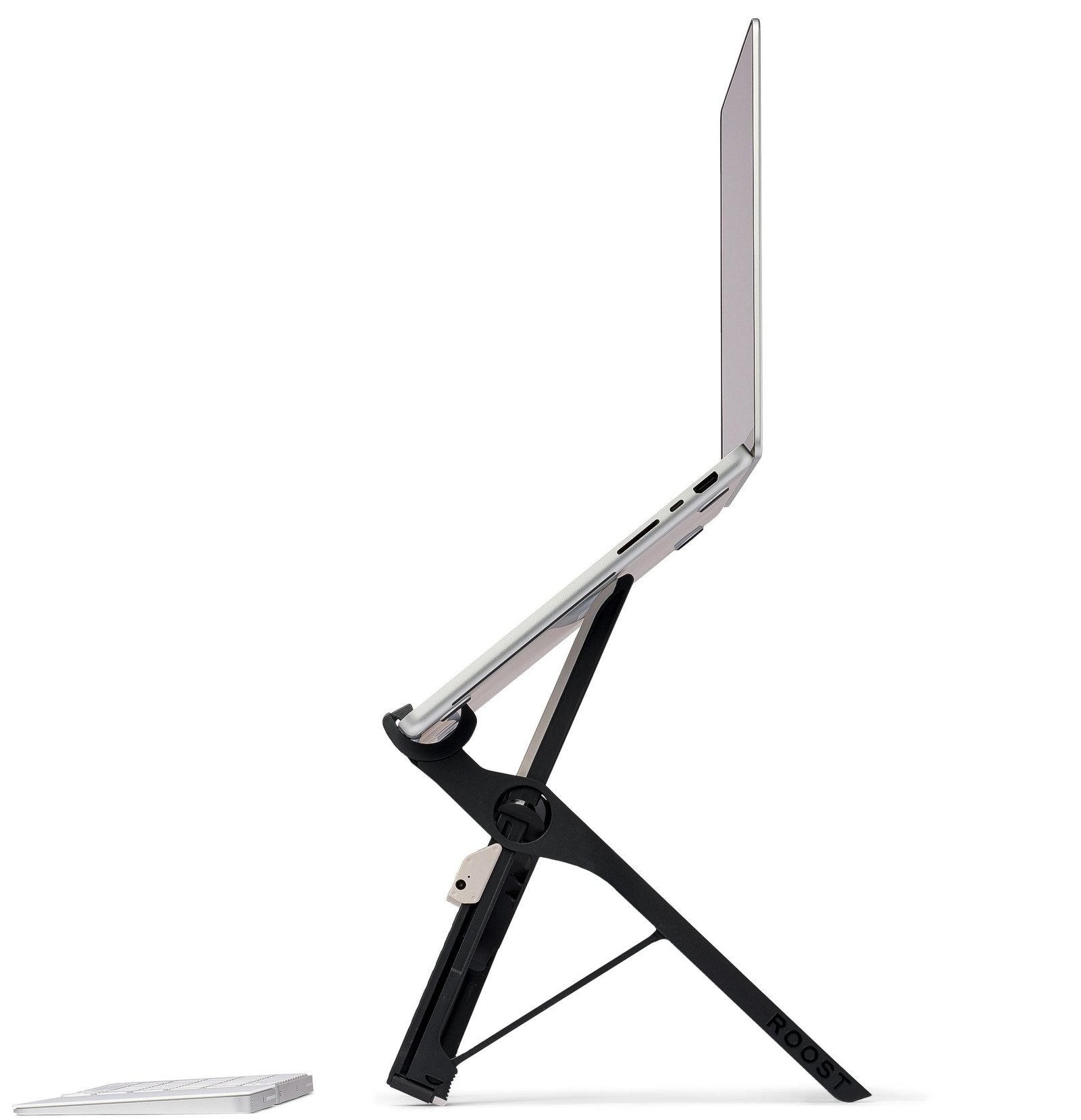
Roost V3 portable laptop stand
Most laptop stands are desk furniture. The Roost V3 is travel gear. It weighs only about 6 ounces, folds down into a slim stick barely thicker than a pen case, and slips into a laptop sleeve with its carry pouch. Yet unfolded, it lifts your screen through 7 height settings to roughly 6.5 to 12.5 inches of lift, which is more height range than most desk stands offer. For digital nomads, consultants, and anyone who works from coffee shops and coworking spaces, there is nothing else quite like it.
The engineering is serious: glass-fiber reinforced nylon gives it a rigid, confidence-inspiring feel under load, and soft TPU rubber grips protect aluminum laptop finishes from scratches. It fits laptops roughly 13 to 16 inches, and the pivoting grips adjust to different laptop thicknesses without extra clips. Reviewers who have used Roost stands for years praise the stability at full height, and a base redesign fixed the wobble that earlier versions showed.
The price is the hard part: around $90 is a lot for something that looks like a folding stick, and it only makes sense if your laptop actually travels. You also need an external keyboard and mouse to use it properly, which adds to the kit. And note the size limits: very small 11 to 12 inch ultraportables and 17-inch gaming laptops fall outside its range. If your laptop lives on one desk, buy the SOUNDANCE or mStand instead and save the money.
Pros:
- About 6 ounces and folds to a slim stick – genuinely pocketable
- 7 height settings with up to roughly 12.5 inches of lift
- Rigid glass-fiber frame, stable even at maximum height
- Soft TPU grips protect laptop finishes
- Sets up in seconds with no tools
Cons:
- Around $90 – hard to justify for a desk-bound laptop
- Needs an external keyboard and mouse to be useful
- Fits roughly 13 to 16 inch laptops only
Best for: Travelers, remote workers, and coffee-shop regulars who carry their office in a bag.
Who should avoid it: Anyone whose laptop stays on one desk, or owners of very small or very large laptops.
6. Twelve South BookArc Flex – Best Vertical Stand for Clamshell Setups
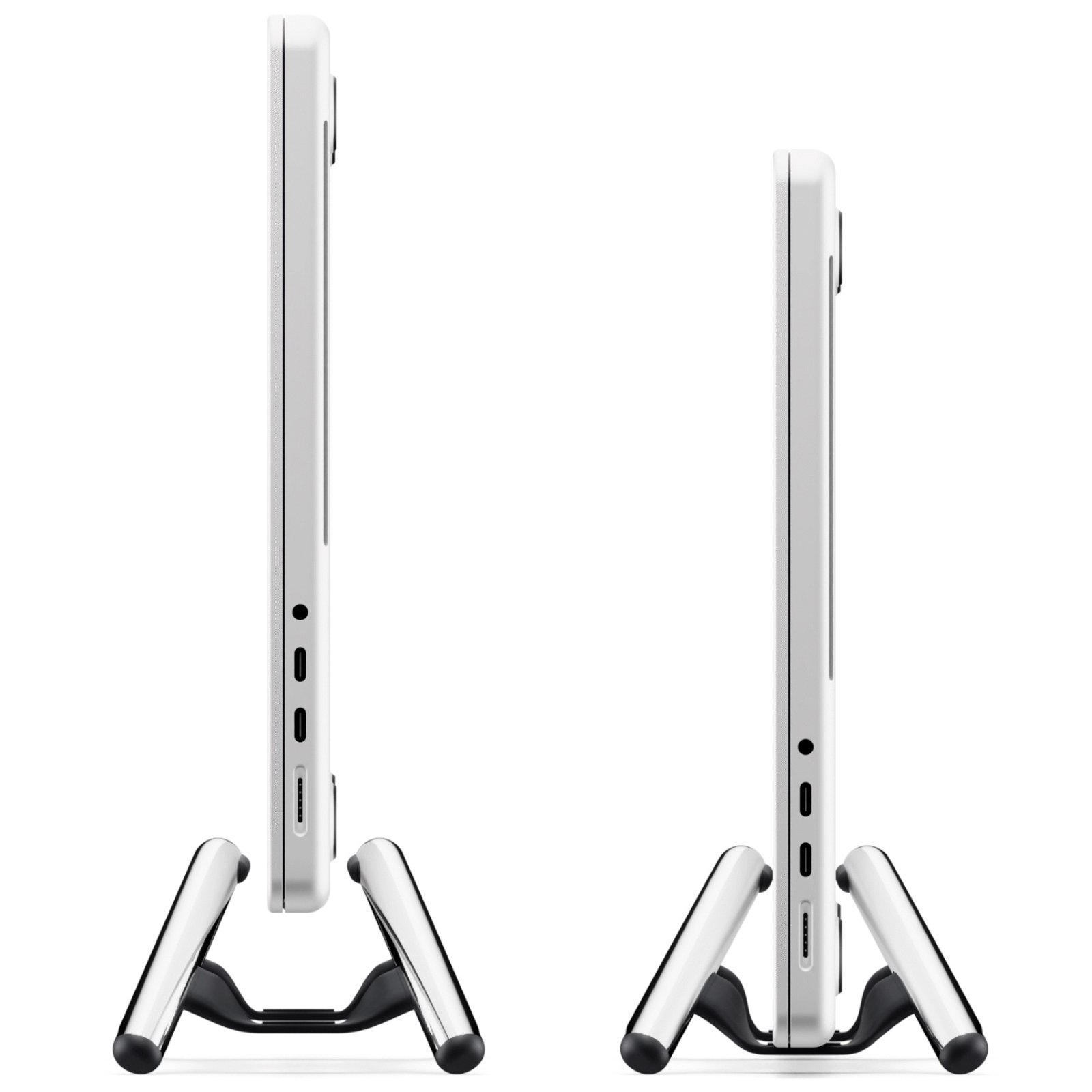
Twelve South BookArc Flex vertical laptop stand
The BookArc Flex plays a different game from every other stand here: it does not lift your laptop screen at all. It holds your closed laptop vertically, like a book on a shelf, while you work on an external monitor. If your desk is small and your monitor is big, this little arc frees up the entire footprint your laptop would otherwise occupy, leaving room for a full-size keyboard, mouse, and a large display.
The design is clever. Two metal arcs are joined by a flexible saddle, and your laptop’s own weight pulls the arcs together to grip it. There are no inserts to swap, and it fits any laptop up to 16 inches and under 1 inch thick, so it adapts to your next laptop too. It costs around $50, takes up only about 8.4 by 3.6 inches of desk, and looks genuinely beautiful next to a monitor.
The honest caveats matter here. First, this only works if you already own an external monitor, keyboard and mouse – without them, you have parked your only screen. Second, one long-term review flagged stability trust: the laptop must sit centered in the saddle, or it can shift. Place it carefully, check it is seated, and it stays put. Used as intended, it is the best space-saving stand in this guide.
Pros:
- Frees the entire laptop footprint for a big external monitor
- Self-adjusting saddle fits laptops up to 16 inches and under 1 inch thick, no inserts
- Tiny footprint, about 8.4 by 3.6 inches
- Beautiful all-metal design that suits a premium desk
- Works with your next laptop too, not just this one
Cons:
- Useless without an external monitor, keyboard and mouse
- Laptop must be centered carefully or it can shift
- Does not lift or improve the laptop’s own screen at all
Best for: Small desks with a big external monitor, and MacBook users running clamshell mode.
Who should avoid it: Anyone who works on the laptop screen itself, or who has no external monitor.
Comparison Table
| Product | Best For | Standout Feature | Price (approx) |
|---|---|---|---|
| Rain Design mStand | Permanent desk | Single-piece aluminum, 5.9 inch fixed lift, heat-sink panel | Around $50 |
| Nulaxy C5 | Sit-to-stand adjustable | Height range about 1.18 to 21 inches, pull-handle switching | Around $50 |
| SOUNDANCE LS1 | Budget fixed riser | 6 inch lift, 5 mm aluminum, open frame cooling | Around $33 |
| Lamicall Adjustable | Large laptops, shared desks | Fits up to 17.3 inches, heavy stable base, foldable | Around $35 |
| Roost V3 | Travel | About 6 ounces, folds to a stick, 7 height settings | Around $90 |
| Twelve South BookArc Flex | Clamshell monitor setups | Vertical storage, self-adjusting saddle, tiny footprint | Around $50 |
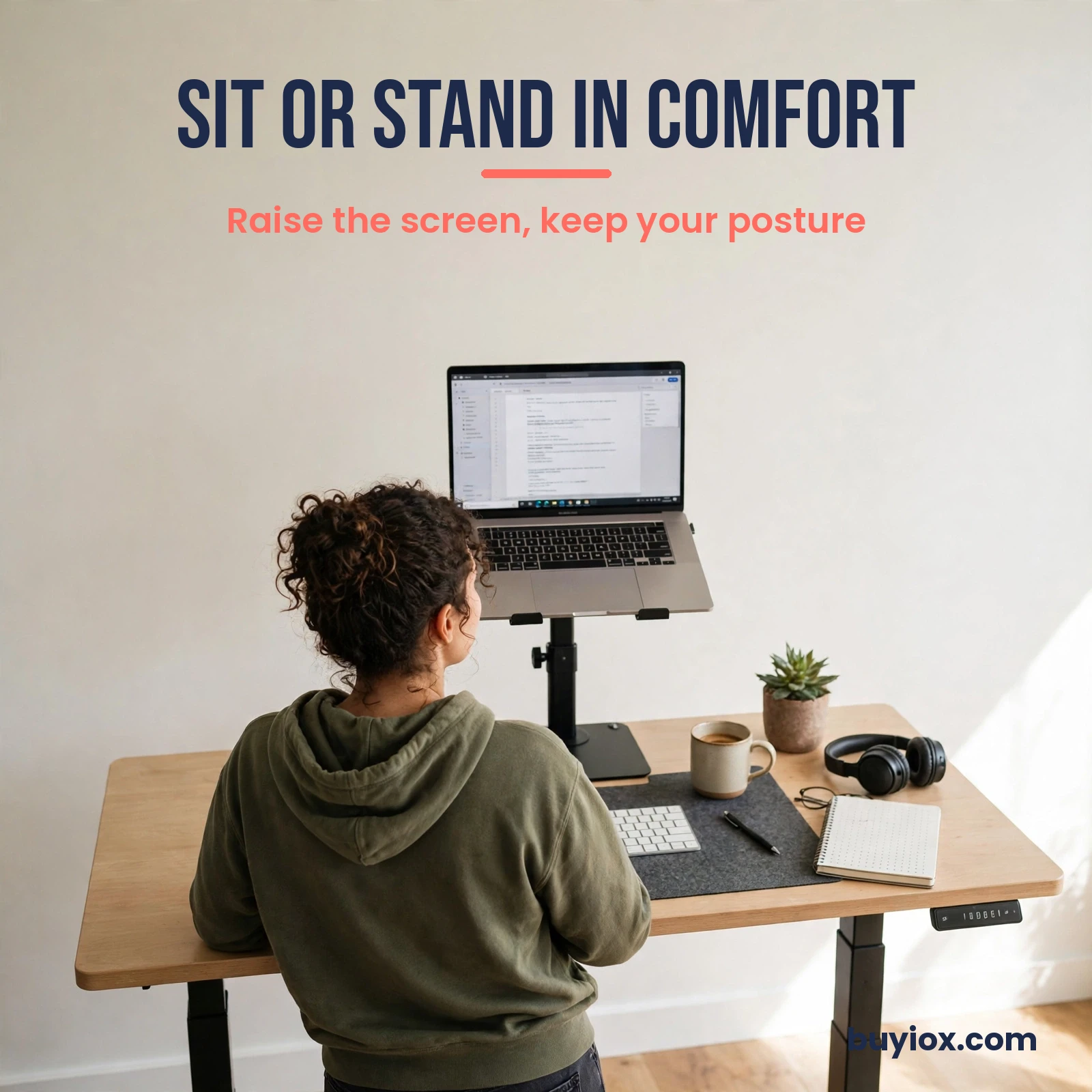
A tall adjustable stand turns any desk into a comfortable standing workstation.
Buying Guide: How to Choose the Right Laptop Stand
Picking a stand is easier when you work through five questions in order. Get these right and you will buy once, not twice.
Fixed or adjustable?
Fixed stands like the mStand and SOUNDANCE LS1 are simpler, sturdier, and cheaper, and they suit anyone with one desk and one user. Adjustable stands like the Nulaxy C5 and Lamicall suit shared desks, changing postures, and sit-to-stand routines. Rule of thumb: if only you use the desk and you always sit, go fixed. If anything varies, go adjustable.
How much height do you actually need?
Measure, do not guess. Sit upright at your desk and have someone measure from the desk surface to your eye level. Then check the stand’s lift against your laptop’s screen size: a 13-inch laptop needs more lift than a 16-inch one to reach the same eye level, because its screen is shorter. The OSHA rule is your target: top of the screen at or just below eye level, screen center about 15 to 20 degrees below your horizontal gaze. Most seated users land between 4 and 7 inches of lift. If you are tall, work standing, or use a small laptop, aim for the adjustable end of the range.
What size and weight is your laptop?
Check two numbers on every listing: the supported laptop size range and the weight limit. A stand rated to 8.8 lbs is fine for ultrabooks but not for a 17-inch gaming machine. Also check depth: some stands, including the mStand, limit how deep a laptop can be. When in doubt, choose a stand rated above your laptop’s actual weight with room to spare.
Aluminum or plastic, open or solid?
Aluminum wins for most buyers: it is stiffer, lasts longer, and conducts heat away from the laptop. Open-frame designs add airflow, which helps a laptop that runs hot during video calls or heavy work. Solid panels look cleaner and double as heat sinks, but they trap a little more warmth underneath. Plastic stands save money but flex under heavier laptops and age worse. For a daily-use stand, aluminum is worth the small premium.
Will it travel, and what else does your desk need?
If the stand leaves the house, weight and folded size matter more than anything else, which is why the Roost V3 exists. If it never moves, ignore portability and spend on stability instead. And remember the pairing rule: every stand in this guide works best with an external keyboard and mouse. A good desk lamp also matters for eye comfort during long sessions, which is why we also cover the best desk lamps for home offices. If you want the full sit-to-stand experience, pair a tall stand like the Nulaxy C5 with one of the best standing desk converters for a complete ergonomic setup.
Frequently Asked Questions
What height should a laptop screen be for ergonomics?
The top of the screen should sit at or just slightly below your eye level when you are sitting upright, with the center of the screen about 15 to 20 degrees below your horizontal line of sight. For most people that means lifting the laptop roughly 4 to 7 inches, and keeping it about an arm’s length away. Adjustable stands make hitting this position much easier than fixed ones.
Do laptop stands actually help neck pain?
Yes, when used correctly. A laptop flat on a desk forces your head to tilt downward for hours, which loads the neck and upper back. Raising the screen to eye level restores a neutral head position and removes that constant downward pull. The catch is that you must pair the stand with an external keyboard and mouse, or you simply move the strain from your neck to your wrists and shoulders.
Do I really need an external keyboard with a laptop stand?
For full-day work, yes. OSHA guidance recommends full-sized auxiliary keyboards for laptops used as primary computers. Without one, the raised keyboard sits at chin height and forces your shoulders up and your wrists into an awkward bend. A basic external keyboard and mouse cost little and are what turn a stand from a nice accessory into a real ergonomic fix.
Can I just stack books instead of buying a stand?
Yes, for testing. A stack of books or a sturdy box raises the screen exactly like a stand does, and it is the smartest way to find out whether a higher screen helps your neck before you spend money. A dedicated stand mainly buys you stability, ventilation, a smaller footprint, and a tilt angle that books cannot provide. If the book stack helps, a stand will help more.
Is a vertical laptop stand good for posture?
Only if you use an external monitor. A vertical stand holds the laptop closed or on its side to save desk space, which hides the laptop screen entirely. That is fine when a separate monitor at eye level is doing the work, and useless if the laptop screen is your only display. Buy a vertical stand for space saving, not for screen ergonomics.
Will a laptop stand keep my laptop cooler?
It helps, but it is not a cooling system. Open-frame stands improve airflow under the laptop, and aluminum panels draw some heat away from the chassis, which can reduce thermal throttling during heavy work. But a stand will not fix a laptop with clogged vents or failing fans. Think of cooling as a bonus, not the reason to buy.
What size laptop stand do I need?
Match the stand to your laptop’s size and weight, not just its screen size. Check the listing’s supported size range and weight limit, and confirm the depth limit if your laptop is thick. A 15.6-inch ultrabook and a 15.6-inch gaming laptop can weigh very different amounts, and a stand rated for one may struggle with the other. When in doubt, pick a stand rated above your laptop’s weight.
Final Verdict
Start with your desk, not the product page. If your laptop lives on one desk, buy the Rain Design mStand: it is the most solid, longest-lasting stand here, and around $50 buys you a decade of better posture. On a tight budget, the SOUNDANCE LS1 at around $33 gets you 90 percent of the benefit for two-thirds of the price.
If you share a desk or switch between sitting and standing, the Nulaxy C5 is the clear pick, with a height range nothing else here matches. Big-laptop owners should look at the Lamicall Adjustable, travelers should save up for the Roost V3, and small-desk monitor users should consider the BookArc Flex. Whichever you choose, pair it with an external keyboard and mouse, set the screen top at or just below eye level, and your neck will notice the difference within a week.