
Affiliate Disclosure: Buyiox is reader-supported. When you buy through links on this page, we may earn a small commission at no extra cost to you. We only recommend products we would use for our own dogs.
6 Best Pet Cameras for Dogs That Let You Watch, Talk and Treat From Anywhere
You leave for work, and the guilt starts before you reach the end of the street. Is your dog pacing by the door? Is it barking at every sound? Is it chewing the couch cushion again, or just sleeping peacefully on it like the good dog you tell your friends it is? You will not know until you get home, and by then the damage is done, the neighbors have already complained, and your dog has spent eight hours alone with its own anxiety. A pet camera ends that guessing game in one move. Open your phone at lunch, see your dog, talk to it in your own voice, and toss it a treat for being calm. That is the whole promise, and for a surprising number of dog owners, it is the difference between dreading the workday and getting through it.
But not every pet camera keeps that promise. Some of them charge a monthly fee for the very features that made you buy the camera in the first place. Some of them jam every third treat. Some of them only work on one Wi-Fi band, or only show you one corner of the room while your dog destroys the other corner. And the price on the box is rarely the real price, because the subscription is where the money actually goes. We researched the six cameras below from manufacturer specifications, current retailer listings, and published independent reviews, and we worked out the honest total cost of each one, device plus plan, so you can see what you are really signing up for. This guide is research-based: we did not hands-on test every camera, and we say so plainly, because an honest review is worth more than a pretend one.
The short version is this: the Furbo 360 is the best pet camera for most dog owners, because it rotates to follow your dog and its treat tossing is the most reliable in the category. The Petcube Bites 2 Lite is the best value treat camera, with the biggest treat hopper and no subscription needed for the core features. The eufy D605 is the only pick here with no subscription at all, because everything stores locally. And if you only want to watch your dog, not treat it, the Wyze Cam v4 and the Blink Mini 2 do the watching job for around the price of a bag of dog food. Read on for the full breakdown, the comparison table, and the buying guide that will stop you buying the wrong camera.
Our Top 6 Pet Cameras at a Glance
Here is the whole roundup in one table, with the price that matters: the typical street price of the camera itself, and what the subscription adds. Prices move constantly, so treat every figure here as an estimate and check the live price on Amazon before you buy. The full comparison table with specs sits further down the page.
- 1. Furbo 360 Dog Camera – Best Overall. 1080p, 360-degree rotating view, treat tossing, color night vision. Around $180, plus an optional Dog Nanny plan around $6.99 a month.
- 2. Petcube Bites 2 Lite – Best Treat Dispenser Value. 1080p, 160-degree wide view, 1.5 lb treat hopper, all core features free. Around $70.
- 3. eufy Pet Camera D605 – Best Without a Subscription. 1080p, 270-degree pan with AI pet tracking, 16GB local storage, no monthly fee at all. Around $130, list $199.99.
- 4. Petcube Cam 360 – Best Budget Pan-Tilt. 1080p, 360-degree pan-tilt, night vision to 30 feet, privacy mode. Around $47.
- 5. Wyze Cam v4 – Best Budget Camera, No Treats. 2.5K QHD, color night vision, free local recording to microSD, spotlight and siren. Around $35.
- 6. Blink Mini 2 – Best Tiny Budget Camera. 1080p, 143-degree view, spotlight, color night vision, Alexa built in. Around $40.
One warning before you read the reviews: check the listing title before you buy a Furbo or a Petcube. Both brands sell versions of their cameras that require a subscription to activate, and versions that do not. The listing title will say so, and the price difference is large. A cheap Furbo that needs a plan is not a bargain once the plan is added, and a Petcube that needs a plan is not the free-core-features camera we praise below. Buy the version this guide describes, and you will get the camera we reviewed.
1. Furbo 360 Dog Camera – Best Overall
The Furbo 360 is the camera most dog owners picture when they think of a pet camera, and there is a reason for that. It is the only camera here built from the ground up around dog behavior instead of adapted from a home security camera. It rotates a full 360 degrees to follow your dog around the room, it tosses treats on command, it listens for barking with an AI trained on dog sounds rather than generic noise, and it does all of it through the most polished app in the category. If you want the camera that does the most for an anxious dog, this is it, and it is not close.
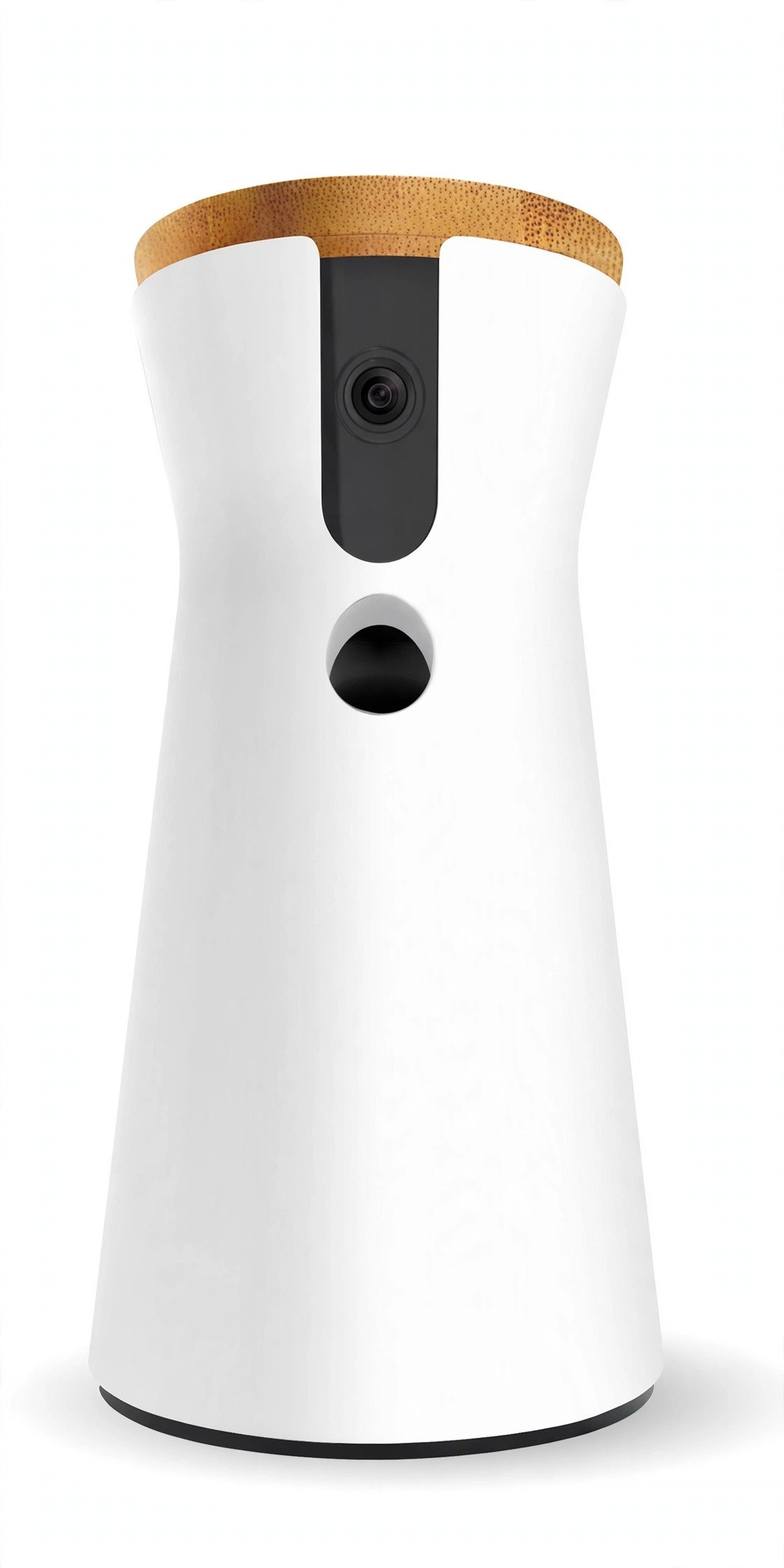
Furbo 360 Dog Camera – white body with a bamboo wood top, a black lens strip, and the treat opening below the lens.
Why we like it
The headline feature is the rotating camera. Most pet cameras stare at one corner of the room, and your dog spends the day in the other corner. The Furbo 360 turns to follow your dog, either automatically with AI tracking or manually from the app, so a pacing dog stays in frame instead of wandering out of shot. That matters more than it sounds, because a dog with separation anxiety does not sit still. It paces, it circles, it moves from the door to the window to the couch, and a fixed camera loses it every time. The Furbo keeps it in view, and that is the whole point of owning a camera.
The treat tossing is the second reason this camera leads the roundup. It holds around 100 small dry treats and tosses them up to about 6 feet, far enough to reach a dog lounging on the couch. You can toss one treat at a time or schedule automatic tosses through the day, which is a genuinely useful training tool: a treat that arrives while your dog is lying calmly teaches it that calm behavior pays. The catch is treat size. Round, uniform, dry treats around pea size work reliably. Bone-shaped treats, soft treats, and oversized kibble jam the mechanism, and that is the most common owner complaint. Use the right treats and it works. Use the wrong treats and you will be shaking the camera.
The video is 1080p Full HD with 4x digital zoom and color night vision, which means you can actually see what your dog is doing at 2 in the morning instead of staring at a grainy green image. The two-way audio is loud enough to get a dog’s attention, which is not true of every camera here. And the barking alerts are tuned to dog vocalizations specifically, so you get an alert when your dog barks, not when a truck drives past. The camera runs on 2.4 GHz Wi-Fi only, so check that your router still broadcasts that band before you buy, and note that the box includes a cable but no USB power adapter, so you may need a 5V 2A adapter.
The subscription question, answered honestly
Here is where the Furbo gets complicated, and where most reviews stop being honest. The Dog Nanny plan costs around $6.99 a month, or around $69 a year if you pay annually. Without it, you still get live video, manual rotation, treat tossing, two-way audio, and basic barking alerts. With it, you get the smart alerts, the cloud video history, the person alerts, the daily doggie diary, and the smoke and carbon monoxide alarm detection. Some current Amazon listings are titled as subscription-required versions, and some reviewers report that newer Furbo cameras need a Nanny plan to activate at all. That is why the listing title matters so much, and why the real first-year cost of this camera is not the price on the box. At around $180 for the camera plus around $69 a year for the plan, the honest first-year cost is around $249, and the three-year cost is around $387. That is the most expensive camera in this roundup by a wide margin, and you should know it before you buy, not after.
Is it worth it? For a dog with real separation anxiety, yes. The 360-degree tracking plus the bark alerts plus the treat tossing is a combination no other camera here matches, and the AKC guidance on separation anxiety in dogs explains that the condition is a genuine distress response, not bad behavior, which means the tools that calm it are worth paying for. For a calm dog that mostly sleeps while you are out, no. Buy the Petcube Bites 2 Lite or the Wyze Cam v4 instead and keep the money.
Pros
- 360-degree rotating camera with auto pet tracking keeps a pacing dog in frame
- Most reliable treat tossing in the category, with scheduled tosses
- Color night vision and 1080p video that stays clear day and night
- Bark detection AI tuned specifically to dog sounds
- Best app in the category, with Alexa and Google Home support
Cons
- Most expensive total cost here once the Dog Nanny plan is added
- Some listings require a subscription to activate, so read the listing title carefully
- Treat size is picky: only small, round, dry treats work reliably
- 2.4 GHz Wi-Fi only, and no USB power adapter in the box
- Cloud video history and smart alerts sit behind the paywall
Best for: owners of dogs with separation anxiety, owners who work long hours away from home, and anyone who wants the most capable treat-tossing camera available. Who should avoid it: anyone who refuses another monthly bill, anyone with a calm dog that only needs watching, and anyone whose router only broadcasts 5 GHz Wi-Fi.
2. Petcube Bites 2 Lite – Best Treat Dispenser Value
If the Furbo is the best pet camera, the Petcube Bites 2 Lite is the best value pet camera, and for most owners it is the smarter buy. It does the three things that matter, live video, two-way audio, and treat tossing, with no subscription at all, and it does them with the biggest treat hopper in this roundup. At around $70, it costs less than half of what the Furbo costs in its first year, and the money it saves you buys a lot of dog treats.

Petcube Bites 2 Lite – tall slim black body with a round lens near the top and the treat slot at the bottom.
Why we like it
The hopper is the story here. It holds up to 1.5 pounds of treats, which is roughly twice what most treat cameras hold, and it is detachable and dishwasher safe, which matters more than it sounds after a month of use. Three orange inserts come in the box to control how many treats fly out at once, so you can match the toss to your dog’s size: small treats for a small dog, bigger portions for a big dog. The toss itself has three distance settings, short, medium, or long, or you can schedule tosses from the app, so your dog gets a reward on a schedule even when you are stuck in a meeting.
The camera is 1080p Full HD with a 160-degree wide-angle lens and 8x digital zoom, which is wide enough to cover a whole living room from one corner, and the night vision reaches 30 feet, so a dark hallway is no problem. Two-way audio is clear enough for your dog to recognize your voice, and the camera can be wall-mounted with the kit in the box or set on a table or shelf. It connects over 2.4 GHz Wi-Fi only, and it comes with a power adapter in the box, which is a small thing the Furbo gets wrong.
The honest trade-off is the fixed view. There is no pan and no tilt, so what you see is what the 160-degree lens sees. In a small room that is plenty. In a large open-plan room, your dog can wander out of frame, and you cannot turn the camera to follow it. That is the one real weakness, and it is the reason the Furbo wins the overall title. But for the price, and with no subscription needed for live view, audio, treats, and motion and sound alerts, the Bites 2 Lite is the easiest recommendation in this roundup for owners who want treat tossing without ongoing costs.
One more thing to check before you buy: Petcube also sells a version of this camera that requires a subscription, so read the listing title. The version we recommend is the one where live view, two-way audio, night vision, and treat tossing all work with no plan. The optional Petcube Care plan, around $9.99 a month, adds cloud video history, daily diary videos, and human and pet recognition, but most owners will never need it.
Pros
- Biggest treat hopper here: 1.5 lb, dishwasher safe, with three portion inserts
- All core features free: live view, two-way audio, night vision, and treat tossing need no plan
- 1080p video with a wide 160-degree lens and 8x zoom
- Three toss distances plus scheduled tosses from the app
- Wall-mount kit included, and the power adapter is in the box
Cons
- Fixed view with no pan or tilt, so a dog can wander out of frame in a big room
- Treats must be crunchy, uniform, and under 1 inch or they jam
- Motion and sound alerts need the optional Care plan on some listings
- 2.4 GHz Wi-Fi only, and the plastic body feels lighter than the original Bites 2
- Some listings are subscription-required versions, so check the title
Best for: owners who want treat tossing without a monthly bill, multi-dog homes that need a big hopper, and anyone buying their first pet camera. Who should avoid it: owners with a very large open-plan room where a fixed camera loses the dog, and anyone who wants automatic pet tracking.
3. eufy Pet Camera D605 – Best Without a Subscription
The eufy Pet Camera D605 is the pick for anyone who has had enough of monthly bills. It is the only camera in this roundup with no subscription at all. There is no plan to buy, no plan to cancel, and no feature locked behind a paywall. Everything records to 16GB of storage built into the camera, the on-device AI works out of the box, the treat tossing works out of the box, and the price you pay on day one is the price you pay forever. At a list price of $199.99 it looks expensive next to the Furbo, but over three years it is the cheapest full-featured camera here, because the Furbo plus its plan costs roughly twice as much over the same period.
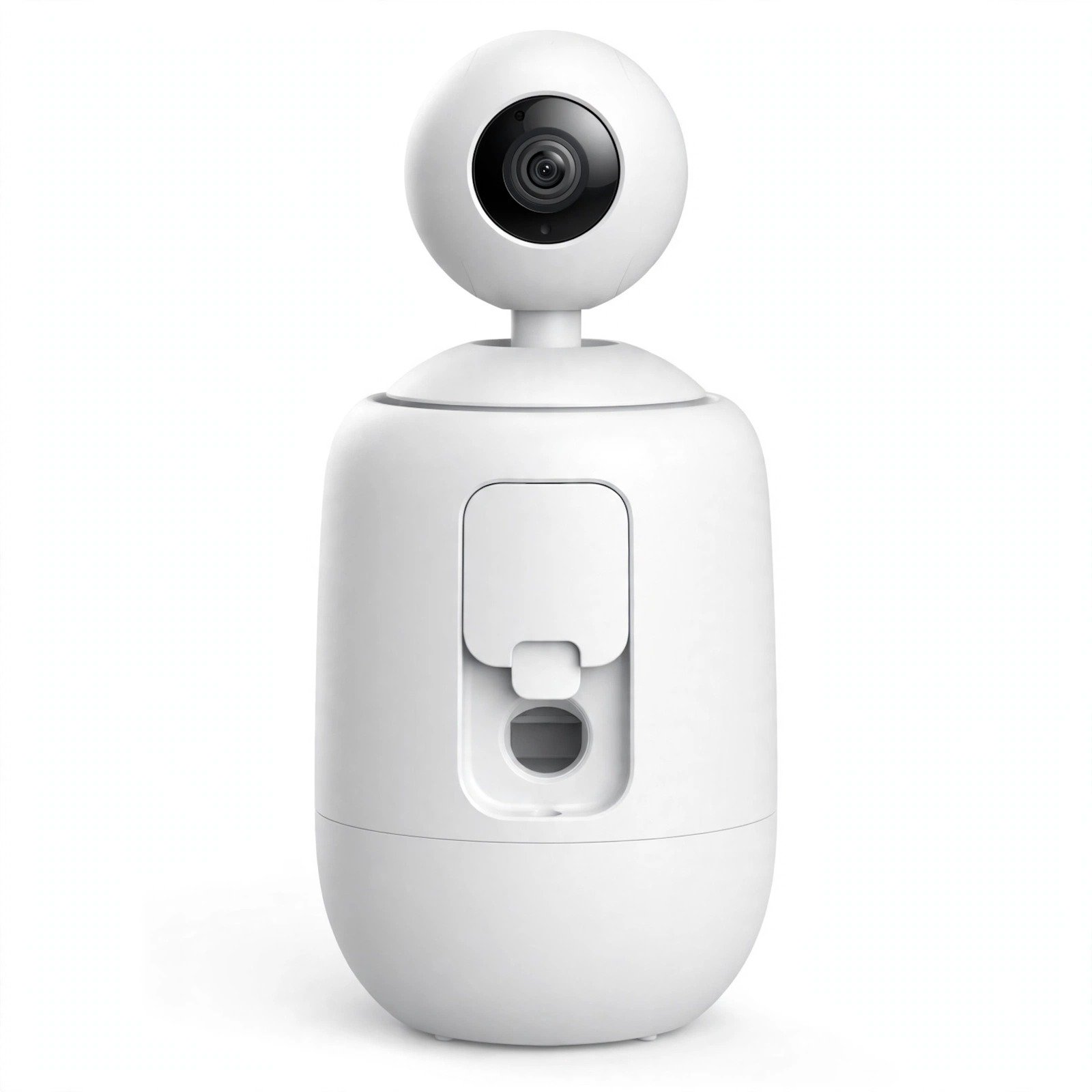
eufy Pet Camera D605 – white rounded body with a rotating camera head on top and the treat dispenser opening on the front.
Why we like it
The headline is the local storage. Sixteen gigabytes of built-in storage holds weeks of clips, and because nothing uploads to a cloud, your home video never leaves your home. For owners who are uncomfortable with cloud video, that is a genuine privacy win, not a marketing line. The on-device AI distinguishes between dogs, cats, and humans and labels notifications accordingly, and it detects barking and crying so you only get alerts that matter. The camera pans 270 degrees with AI pet tracking, so it follows your dog around most of the room, and it tosses treats at three distances with an anti-clog dispenser designed to avoid the jamming that plagues its rivals. The hopper is the largest here at around 1 litre, roughly 200 small treats, and there is a removable cleaning tray, which matters more than it sounds after a month of treat dust.
The video is 1080p on most listings, with some listings claiming 2K, and the night vision uses four infrared LEDs. Two-way audio is included, and the Doggy Diary feature compiles a daily clip of your dog’s day, which is a small delight that owners either love or ignore. The camera is larger than the Furbo and the Petcube, so it needs a proper shelf, and the app is a security camera app first and a pet product second, which means it is less polished than Furbo’s app and does not integrate with Alexa or Google Home in the same way.
The honest caveats are availability and review depth. The D605 has been out of stock at some retailers, so check before you settle on it, and it is a newer product with a thinner base of owner reviews than the Furbo or the Petcube, so long-term durability is less proven. The street price is also well below the list price: roundups put the typical price around $130, against a $199.99 list, so treat the list price as a ceiling, not the price you will actually pay. And like the others, it is 2.4 GHz Wi-Fi only.
Pros
- No subscription at all: every feature works with no monthly bill, ever
- 16GB built-in local storage keeps your video in your home, not a cloud
- 270-degree pan with on-device AI pet tracking and barking and crying detection
- Largest treat hopper here, around 200 small treats, with an anti-clog dispenser
- Doggy Diary daily clip included at no extra cost
Cons
- Highest list price here at $199.99, even if street prices run lower
- Thinner base of owner reviews, so long-term durability is less proven
- 270-degree rotation, not a full 360 degrees
- App is less polished than Furbo’s, and smart home integration is limited
- Sometimes out of stock, and larger than its rivals
Best for: owners who refuse another subscription, privacy-conscious owners who want local storage, and anyone doing the three-year cost math. Who should avoid it: anyone who wants cloud backup of their clips, anyone on a 5 GHz-only Wi-Fi network, and anyone who needs a deep base of owner reviews before they buy.
4. Petcube Cam 360 – Best Budget Pan-Tilt
The Petcube Cam 360 is the cheapest way to get a rotating pet camera, and it is the pick for owners who want room coverage without paying for treats. At around $47, it costs less than a bag of premium dog food, and it pans and tilts to cover a whole room from one small camera that fits in the palm of your hand. It does not toss treats, and it does not track your dog automatically on the free tier, but it watches a whole room, and for a calm dog that mostly sleeps, watching is all you need.

Petcube Cam 360 – small white pan-tilt camera with a black rotating head and round lens on a small round base.
Why we like it
The size is the first surprise. At 2.2 by 2.2 by 2.7 inches, the Cam 360 is tiny enough to sit on a bookshelf, a TV stand, or a windowsill without dominating the room, and the motorized base pans a full 360 degrees and tilts up and down, so you can sweep the whole room from your phone. The video is 1080p HD with 8x digital zoom, the night vision reaches 30 feet, and the two-way audio lets you talk to your dog. Live streaming is free out of the box, with no subscription needed just to watch.
The privacy mode is a thoughtful touch that the bigger cameras skip. When you are home, the lens physically blocks itself, so the camera cannot see you even by accident. That matters if the camera sits in a bedroom or a living room where the family spends the evening, and it is a better answer than a piece of tape over the lens. Family sharing is included, so two people can check on the dog, and Alexa integration works for voice control.
The trade-offs are honest ones. Pan and tilt are manual on the free tier: you drive the camera from the app, and it does not follow your dog by itself. Automatic pet tracking, smart alerts, and video history need the optional Petcube Care plan, which starts at around $5.99 a month on the Optimal plan. There is no treat dispenser, no HomeKit, and no Google Assistant integration, and the camera connects over 2.4 GHz Wi-Fi only. The pan range is also reported differently by different sources: most say 360 degrees, one says 350 degrees horizontal with 55 degrees of vertical tilt. Either way, it covers a room.
Pros
- Cheapest rotating pet camera here at around $47
- 360-degree pan-tilt covers a whole room from one tiny camera
- 1080p video with 8x zoom and night vision to 30 feet
- Physical privacy mode blocks the lens when you are home
- Live streaming is free, with family sharing and Alexa support
Cons
- No treat dispenser at all
- Automatic pet tracking and smart alerts need the optional Care plan
- Manual pan-tilt on the free tier means you drive the camera yourself
- Video history is cloud only, with no local storage
- 2.4 GHz Wi-Fi only, and no HomeKit or Google Assistant
Best for: owners who only want to watch their dog, renters and small-home owners who need a tiny camera, and anyone who wants room coverage on a tight budget. Who should avoid it: owners who want treat tossing, owners whose dog needs automatic tracking, and anyone who wants local video storage.

5. Wyze Cam v4 – Best Budget Camera, No Treats
The Wyze Cam v4 is not a pet camera. It is a home security camera that happens to be excellent at watching dogs, and at around $35 it is the cheapest camera in this roundup by a clear margin. What it lacks in pet-specific features it makes up for in raw video quality: 2.5K QHD resolution, which is sharper than every pet camera here, color night vision that actually works, and free 24/7 local recording to a microSD card with no subscription. If your dog is calm, your budget is tight, and you only need to see what is happening, the Wyze Cam v4 is the honest best buy.

Wyze Cam v4 – small white cube camera with a large round black lens, a spotlight strip, and a white folding stand.
Why we like it
The video is the story. At 2560 by 1440 resolution, the v4 shows more detail than any 1080p camera here, and the starlight sensor keeps color at low light instead of switching to grainy black and white the moment the sun goes down. The field of view is 115.9 degrees diagonal, which is wide enough for a room, and the 8x digital zoom lets you check whether that lump on the couch is a sleeping dog or a chewed cushion. The built-in spotlight and the 99 dB siren are security features first, but the spotlight doubles as a way to see your dog clearly at night, and the siren can startle a dog out of mischief, though use it sparingly, because a loud siren can scare an anxious dog badly.
The local recording is the second reason this camera earns its place. A microSD card up to 256GB gives you free 24/7 continuous recording with no subscription, which no pet camera here matches except the eufy. The camera is also IP65 weather resistant, so the same camera can sit on a shelf indoors or under an eave outdoors, and the two-way talk is clear on both ends. It works with Alexa and Google, and it supports Wi-Fi 6.
The trade-offs are the pet features you do not get. There is no treat dispenser, no bark detection, and no pet tracking. Person, pet, package, and vehicle detection sit behind the optional Cam Plus plan at $2.99 a month per camera, so without the plan you get motion detection only. The camera is also 2.4 GHz only, it is wired with a 6-foot cable and a micro-USB connector, which feels dated, and live view needs an internet connection even on your local network. And one honest flag: Wyze had a cloud security incident in the past, which is relevant if cloud privacy is a priority for you. The local recording helps, because your clips can live on your card instead of in a cloud.
Pros
- Sharpest video here: 2.5K QHD with real color night vision
- Free 24/7 local recording to microSD up to 256GB, no subscription needed
- Cheapest camera in the roundup at around $35
- IP65 weather resistant, so it works indoors or outdoors
- Spotlight, 99 dB siren, and clear two-way talk included
Cons
- No treat dispenser, no bark detection, no pet tracking
- Pet detection needs the optional Cam Plus plan at $2.99 a month per camera
- 2.4 GHz only, wired, with a dated micro-USB connector
- Wyze had a cloud security incident in the past
- Live view needs an internet connection even on the local network
Best for: owners of calm dogs who only need to watch, budget buyers, and anyone who wants the sharpest video for the least money. Who should avoid it: owners who want treat tossing or bark alerts, owners of anxious dogs who need pet-specific features, and anyone who wants a camera that works without internet.
6. Blink Mini 2 – Best Tiny Budget Camera
The Blink Mini 2 is the smallest camera in this roundup and the simplest to live with. It is a tiny plug-in camera, about 2 inches on a side, that sits on a shelf, plugs into a wall outlet, and watches your dog in 1080p with a spotlight and color night vision. At around $40 it costs about the same as the Wyze, it is made by Blink, which is owned by Amazon, and it fits into an Alexa home more naturally than any camera here. If you already own Alexa devices, or you want the smallest camera that still does the job properly, this is the one.

Blink Mini 2 – tiny white square camera with a round black lens, a small LED light, and a round white base with a cable.
Why we like it
The size is the point. At 2.0 by 1.9 by 1.5 inches and under 2 ounces, the Mini 2 disappears onto a bookshelf, and the round base lets you angle it toward the couch, the crate, or the door. The video is 1080p HD with a wide 143-degree diagonal field of view, which is the widest fixed view in this roundup, and the built-in spotlight gives you color night vision when there is some ambient light. Two-way audio is clear, motion alerts arrive on your phone, and the camera doubles as a chime for a Blink Video Doorbell if you own one, which is a neat trick no other camera here offers.
Setup takes minutes through the Blink app, and the camera is plug-in only, so there is no battery to charge and no battery to die while you are at work. It works with Alexa for voice control and live view on an Echo Show, and it is the most renter-friendly camera here: no drilling, no mounting, just a shelf and an outlet. Deal prices around $24 appear regularly, so patient buyers can get it for less than the $39.99 list price.
The trade-offs are the same shape as the Wyze. There is no treat dispenser and no pet-specific feature at all. Person detection needs an optional Blink subscription, Basic at $3.99 a month for one device or Plus at $11.99 a month for unlimited devices, and without a plan you get generic motion alerts only. Clip storage is cloud-based unless you add a Sync Module 2 with a USB drive for local storage, which is sold separately. Continuous live view beyond 90 minutes also needs a subscription. And the camera is indoor only, so it cannot watch a yard or a porch without the weather-resistant adapter, which is also sold separately. Confirm the listing says Mini 2, not the original Mini or the newer Mini 2K+, because the three share similar names at different prices.
Pros
- Tiny and renter-friendly: sits on a shelf, plugs in, no drilling or mounting
- Widest fixed field of view here at 143 degrees diagonal
- Built-in spotlight with color night vision and clear two-way audio
- Works as a chime for a Blink Video Doorbell, and fits Alexa homes naturally
- Deal prices around $24 appear regularly
Cons
- No treat dispenser and no pet-specific features
- Person detection and clip storage need an optional Blink subscription
- Local storage needs a Sync Module 2, sold separately
- Indoor only without a weather-resistant adapter, sold separately
- Continuous live view beyond 90 minutes needs a subscription
Best for: renters, Alexa households, and owners who want the smallest camera that still watches properly. Who should avoid it: owners who want treat tossing, owners who want local storage out of the box, and anyone who needs an outdoor camera.
Pet Camera Comparison Table
| Camera | Video | View | Treats | Two-way audio | Subscription | Price |
|---|---|---|---|---|---|---|
| Furbo 360 Dog Camera | 1080p | 360-degree rotating, auto tracking | Yes, up to 6 ft toss | Yes | Optional, around $6.99 a month | Around $180 |
| Petcube Bites 2 Lite | 1080p | 160-degree fixed wide | Yes, 1.5 lb hopper | Yes | Optional, around $9.99 a month | Around $70 |
| eufy Pet Camera D605 | 1080p | 270-degree pan, AI tracking | Yes, 3 distances | Yes | None at all | Around $130, list $199.99 |
| Petcube Cam 360 | 1080p | 360-degree pan-tilt, manual | No | Yes | Optional, from around $5.99 a month | Around $47 |
| Wyze Cam v4 | 2.5K QHD | 115.9-degree fixed | No | Yes | Optional, $2.99 a month for pet detection | Around $35 |
| Blink Mini 2 | 1080p | 143-degree fixed | No | Yes | Optional, from $3.99 a month | Around $40 |
The table tells the story in one look. If you want treats, buy one of the top three. If you only want to watch, buy one of the bottom three and keep the difference. And if you hate subscriptions, the eufy is the only camera here that never asks you for one.
Buying Guide: How to Choose the Right Pet Camera for Your Dog
1. Work out the three-year cost, not the sticker price
The price on the box is the smallest number in the real cost of a pet camera. A $180 Furbo plus a $69 a year plan costs around $387 over three years. A $70 Petcube with no plan costs $70 over three years. A $130 eufy with no plan costs $130 over three years. The cheapest camera on the shelf is often the most expensive camera you will own, and the most expensive camera on the shelf is often the cheapest once the plan is counted. Before you buy, multiply the monthly plan by 36, add the device price, and compare that number. That is the number that matters, and it is the number most roundups never show you.
2. Treat tossing: decide if you actually need it
Treat tossing is the feature that sells pet cameras, and it is also the feature most owners stop using after a month. It is genuinely useful for one job: rewarding a calm dog from a distance, which is a real training tool for separation anxiety. It is a novelty for every other job. If your dog is calm and mostly sleeps, you will toss a treat twice, smile, and never open the app again. If your dog paces, barks, and chews, a scheduled treat every hour is a training program that runs while you are at work. Be honest about which dog you own. If it is the calm one, buy a watcher like the Wyze or the Blink and save the money. If it is the anxious one, buy the Furbo or the Petcube Bites 2 Lite, and read the treat size rules below, because they decide whether the tosser works or jams.
3. Treat size rules: the detail that decides everything
Every treat camera in this roundup jams on the wrong treats, and every owner review that complains about jamming is really a review about treat size. The rules are the same across brands. Use small, round, dry, uniform treats, around pea size, under 1 inch for the Petcube, under 1 centimeter for the Furbo. Never use soft treats, sticky treats, bone-shaped treats, or oversized kibble. Keep treats dry, because damp treats swell and stick. If the tosser jams, empty the hopper, clean it, and switch to a smaller, rounder treat before you blame the camera. A bag of the right treats costs a few dollars and saves you a return.
4. Fixed view vs pan-tilt vs auto tracking
A fixed camera shows you one corner of the room. That is enough if your dog has one bed, one couch, and one routine. A pan-tilt camera lets you sweep the room from your phone, which is enough if your dog moves between two or three spots and you are willing to drive the camera. Auto tracking follows your dog by itself, which is what you need if your dog paces, which is what anxious dogs do. Match the camera to the dog, not to the spec sheet. A calm dog needs a fixed camera. A restless dog needs tracking. And remember that the Petcube Cam 360 only tracks with a paid plan, while the Furbo tracks with the plan too, so the tracking you pay for is not free on either of them.
5. Night vision: color or infrared, and why it matters
Most cameras switch to grainy black and white infrared at night. The Furbo and the Wyze keep color at low light, which means you can tell whether your dog grabbed the red toy or the blue one at 2 in the morning, and whether that dark patch on the rug is mud or something worse. The Petcube and the eufy use infrared, which is fine for telling whether your dog is asleep or awake, but not for detail. The Blink Mini 2 uses a spotlight for color night vision, which works when there is some ambient light. If you check on your dog after dark, which most working owners do, color night vision is worth paying for. If you only check at lunch, it is not.
6. Wi-Fi: the 2.4 GHz trap that catches everyone
Every camera in this roundup runs on 2.4 GHz Wi-Fi only. Not one of them supports 5 GHz, except the WOpet D01 Plus, which we mention below as an alternative. Most modern routers broadcast both bands, often under one network name, and many cameras fail setup because the phone is on 5 GHz while the camera needs 2.4 GHz. Before you buy, check that your router still broadcasts a 2.4 GHz band, and during setup, put your phone on the 2.4 GHz network first. If your router only broadcasts 5 GHz, do not buy any camera in this roundup until you turn the 2.4 GHz band back on. This one check saves more returns than any other.
7. Separation anxiety: what a camera can and cannot do
A camera helps with separation anxiety in three specific ways. It lets you see whether your dog is actually distressed or just bored, which decides whether you need training or just more exercise. It lets you talk to your dog in your own voice, which can calm some dogs and excite others, so test it on a short absence first. And it lets you reward calm behavior with a treat, which is the only one of the three that actually trains the dog. What a camera cannot do is cure separation anxiety. PetMD guidance on separation anxiety in dogs explains that the condition involves real distress, and that treatment usually combines behavior training with, in severe cases, medication from a vet. If your dog panics, drools, destroys things, or hurts itself when you leave, talk to your vet, because a camera plus a vet plan beats a camera alone every time. Our guide to the best dog anxiety vests covers another tool that helps some anxious dogs, and a camera plus a vest plus a training plan is a system, not a gadget.
8. Privacy and storage: cloud vs local
Most pet cameras store video in a cloud, which means your home video sits on someone else’s server, and you pay a monthly fee to see it. The eufy D605 stores video on 16GB of storage built into the camera, so nothing leaves your home and there is no fee. The Wyze Cam v4 records to a microSD card for free, which is the next best thing. The Blink Mini 2 needs a Sync Module 2 for local storage, sold separately. If privacy matters to you, buy local storage. If you want to watch clips from anywhere and never think about storage, buy cloud and accept the fee. Either way, use the privacy mode when you are home, change the default password, and turn on two-factor authentication in the app, because a camera that watches your dog also watches your home.
9. Where to put the camera, and what else your dog needs
Put the camera at your dog’s eye level or slightly above, on a stable shelf, facing the bed, the crate, or the door, which are the three places your dog spends its day. Do not put it on the floor, where a dog can knock it over, and do not put it facing a window, because the backlight will turn your dog into a silhouette. Keep it near an outlet, because every camera here is plug-in, and keep the cable out of reach, because a chewing dog and a power cable are a bad combination. And remember that a camera is one tool in a system. A dog that is watched but bored will still chew, so pair the camera with a safe space. Our guide to the best dog crates covers the crates that give an anxious dog a den, and if your dog roams the neighborhood when it escapes, our guide to the best dog GPS trackers covers the trackers that find it. If you want whole-home coverage rather than one room, our guide to the best home security cameras covers the cameras that watch the rest of the house.
10. Alternatives worth knowing about
Three cameras did not make the final six but deserve a mention. The Furbo Mini 360 is the smaller Furbo, around $35 on sale, with a 2K camera, a 360-degree view, and treat tossing, and it is the cheapest way into the Furbo system. We left it out to avoid two Furbo picks in one roundup. The WOpet D01 Plus, around $100, is the only treat camera here with no subscription and 5 GHz Wi-Fi support, and it is the pick if your router only broadcasts 5 GHz. The Tapo C260, around $60, is a 4K pan-tilt security camera with no subscription that works well as a pet watcher, though it is not pet-specific. If none of the six above fits, check one of these three before you settle.
Frequently Asked Questions
Do pet cameras need a subscription?
It depends on the camera, and it depends on what you mean by need. The eufy D605 needs no subscription at all: every feature works with no monthly bill. The Petcube Bites 2 Lite and the Petcube Cam 360 work fully for live view, two-way audio, and treat tossing with no plan, and the plan only adds cloud history and smart alerts. The Furbo 360 works for live view and treats without a plan on most listings, but some listings require a plan to activate, and the smart alerts and history need the Dog Nanny plan. The Wyze Cam v4 and the Blink Mini 2 work without a plan, but pet detection and person detection sit behind their plans. The honest rule is this: no camera here stops working entirely without a plan, but the features that made you buy the camera are sometimes the features behind the paywall, so read the listing title and the plan details before you buy.
Can a pet camera help with separation anxiety?
Yes, but only as part of a plan, not as a cure. A camera helps you see whether your dog is distressed or bored, it lets you talk to your dog and toss it a treat for calm behavior, and it lets you check whether your training is working. It does not cure anxiety by itself. VCA Hospitals guidance on separation anxiety in dogs explains that the condition needs behavior modification, and that medication from a vet helps in severe cases. If your dog panics when you leave, use the camera to watch, use treats to reward calm, and talk to your vet about a training plan. A camera plus a vet plan is a system, and a system is what actually helps an anxious dog.
What treats work in a pet camera treat dispenser?
Small, round, dry, uniform treats, around pea size. For the Petcube, crunchy treats under 1 inch. For the Furbo, round treats under 1 centimeter. For the eufy, small dry treats around 10 to 25 millimeters. Never use soft treats, sticky treats, bone-shaped treats, or oversized kibble, because they jam the mechanism, and that is the most common complaint about every treat camera. Keep treats dry, because damp treats swell and stick. If the tosser jams, empty the hopper, clean it, and switch to a smaller, rounder treat before you blame the camera.
Do pet cameras work on 5 GHz Wi-Fi?
Almost never. Every camera in this roundup runs on 2.4 GHz Wi-Fi only, and that includes the Furbo, both Petcubes, the eufy, the Wyze, and the Blink. If your router only broadcasts 5 GHz, these cameras will not connect. Check that your router still broadcasts a 2.4 GHz band, and put your phone on the 2.4 GHz network during setup. The one exception worth knowing is the WOpet D01 Plus, which supports 5 GHz, and it is the pick if your home runs 5 GHz only.
Can I use a pet camera without Wi-Fi?
No, not in any useful way. Every camera here needs Wi-Fi to stream video to your phone, and most of them need an internet connection even to show a live view on your local network. The Wyze Cam v4 can record continuously to a microSD card without a subscription, and the eufy D605 records to its built-in storage, but you still need Wi-Fi to watch the video live from work. If your internet goes down, the cameras keep recording locally where they support it, and you can watch the clips when the connection returns. A camera without Wi-Fi is a paperweight, so do not buy one for a home with no internet.
Is it safe to leave a pet camera on all day?
Yes. Every camera here is designed to run plugged in all day, every day, and the power draw is tiny, around a few watts. The real safety question is the cable, not the camera. Keep the power cable out of your dog’s reach, because a chewing dog and a live cable are a bad combination, and run the cable behind furniture where a dog cannot get at it. Also use the privacy mode when you are home, change the default password, and turn on two-factor authentication in the app, because a camera that watches your dog also watches your home, and an unsecured camera is an open window.
Do pet cameras record at night?
Yes. Every camera here has night vision, and the differences are in quality, not in whether it works. The Furbo and the Wyze keep color at low light, which is the best night image here. The Petcube cameras and the eufy use infrared, which gives a clear black and white image out to 30 feet. The Blink Mini 2 uses a built-in spotlight for color night vision when there is some ambient light. If you check on your dog after dark, which most working owners do, color night vision is worth paying for. If you only check at lunch, infrared is plenty.
Our Verdict: Which Pet Camera Should You Buy?
If you only buy one pet camera, buy the Furbo 360 Dog Camera. It is the best pet camera for most dog owners because it gets the hard parts right: a 360-degree rotating camera that follows your dog, the most reliable treat tossing in the category, color night vision, and bark alerts tuned to dog sounds. At around $180 for the camera plus around $69 a year for the Dog Nanny plan, it is the most expensive camera here, and you should know that before you buy. But for a dog with separation anxiety, for an owner who works long hours, and for anyone who wants the most capable camera available, it is the honest best overall pick, and the subscription is the price of the best tool.
But the right camera depends on your dog and your budget, not on a ranking. If you want treat tossing without a monthly bill, buy the Petcube Bites 2 Lite, because the 1.5 lb hopper is the biggest here, every core feature is free, and at around $70 it costs less than half of what the Furbo costs in its first year. If you refuse another subscription on principle, buy the eufy Pet Camera D605, because it is the only camera here with no plan at all, and over three years it is the cheapest full-featured camera in the roundup. If you only want to watch your dog and you want room coverage, buy the Petcube Cam 360, because 360-degree pan-tilt for around $47 is a bargain. If you only want to watch and you want the sharpest video for the least money, buy the Wyze Cam v4, because 2.5K video and free local recording for around $35 is unmatched. And if you want the smallest camera that still does the job, buy the Blink Mini 2, because it disappears onto a shelf and fits an Alexa home perfectly.
Whatever you buy, work out the three-year cost before you pay, check that your router broadcasts 2.4 GHz Wi-Fi, read the listing title to make sure you are buying the version without a forced subscription, and use small, round, dry treats. A camera that fits your dog, your home, and your budget is a camera you will actually use, and a camera you use every day is the difference between guessing how your dog spends its day and knowing. Pick the camera that fits, set it up on a stable shelf at your dog’s eye level, and check on your dog at lunch tomorrow. You will be glad you did.