As an Amazon Associate I earn from qualifying purchases. This costs you nothing extra and helps us keep Buyiox free.
Your Grandkids’ Best Moments Are Stuck on a Phone Nobody Opens
Think about the last time you looked at your favorite family photos. Not scrolled past them – really looked. For most of us, the honest answer is weeks or months ago. Thousands of photos sit on our phones, backed up to clouds we never open, shared in group chats that scroll away by morning. And the people who would treasure those moments most – grandparents, parents, the aunt across the country – see them the least.
A digital photo frame fixes this in the simplest way possible. It is a picture frame that never runs out of photos. New pictures arrive automatically from your phone, appear on the frame in seconds, and just keep playing. No group chat to keep up with, no tablet to tap through, no slideshow to restart. It hangs on a wall or sits on a shelf and does its one job: keeping family memories visible.
That simplicity is exactly why these frames have become one of the most gifted tech products of the decade – and exactly why buying one is harder than it looks. The spec sheets all say the same things: WiFi, app, touchscreen. What they do not say is whether the app is a joy or a headache, whether a grandparent can set it up alone, or whether the frame quietly needs a monthly subscription to do the things the box promised. Those are the things gift-buyers actually worry about, and they are the things this guide answers.
We researched six real, currently available digital photo frames – Aura, Nixplay, Skylight, Frameo and Dragon Touch models – verifying specs against official brand pages and current listings. Every pick below comes with honest notes on app quality, setup difficulty for non-tech-savvy recipients, and exactly what is free versus what needs a subscription. No wrong information, no invented specs.
A note on how we present our picks: these are research-based recommendations, not lab-tested claims. Every spec below comes from official brand or retailer listings, and prices are marked approximate because they shift constantly on Amazon.
Quick Comparison: The 6 Best Digital Photo Frames
| Product | Best For | Approx. Price |
| — | — | — |
|---|---|---|
| Aura Walden 15-inch WiFi Digital Frame | Best overall | Around $299 |
| Nixplay 10.1-inch Smart Digital Photo Frame | Best app experience | Around $165 |
| Skylight Frame 10-inch | Easiest setup for grandparents | Around $150 |
| AKImart 10.1-inch WiFi Digital Picture Frame | Best budget pick | Around $80 |
| Aura Carver 10.1-inch | Best compact premium | Around $149 |
| Dragon Touch Classic 10 Digital Picture Frame | Best large-screen value | Around $60 |
Prices change often on Amazon, so treat these as rough guides. The links below take you to live Amazon search results where you can check the current price.
1. Aura Walden 15-inch WiFi Digital Frame – Best Overall

The Aura Walden: 15-inch 1600×1200 display, free unlimited storage, and no subscription ever.
The Aura Walden is the frame this category keeps being measured against. It is the big one: a 15-inch, 1600×1200 color-calibrated display that looks like a real framed print, not a tablet. The 4:3 aspect ratio matters more than it sounds – smartphone photos fit it with minimal cropping, so faces stay faces instead of being zoomed into foreheads. Auto brightness, auto on/off at night, and portrait or landscape auto-rotation mean the frame manages itself once it is set up.
Where the Walden pulls ahead is the sharing system. The free Aura app is consistently praised as the easiest in the category – one reviewer timed setup at about a minute – and family members who will never install an app can still send photos by text message, by a unique frame email address, through iCloud or Google Photos sync, or a web uploader. Invite the whole family and photos appear on the frame in seconds, from anywhere in the world. There is no subscription and no storage cap: Aura’s official FAQ states it plainly, no subscriptions or fees with free unlimited photo and video storage (https://help.auraframes.com/hc/en-gb/articles/360049410694-Overview-of-Aura-Frame-Models).
For gifting, the Walden has the best trick in the category: Gift Mode. You can preload photos and even enter the recipient’s WiFi details before you wrap it, so on the day, grandma plugs it in and photos are already there. The built-in speaker plays videos with sound, a stand and wall-mount hook are both in the box, and a sleep sensor turns the frame off at night.
The honest trade-offs: at over 7.8 pounds, this is a substantial frame – fine on a shelf, a chore to wall-mount. The resolution is not Full HD, though at typical viewing distance the color calibration carries it. And it is the most expensive pick here at around $299. If 15 inches is too much presence, the Aura Carver below is the same ecosystem in a smaller, cheaper frame.
Pros:
- 15-inch color-calibrated display looks like a real framed print
- No subscription, free unlimited photo and video storage, ever
- Family sends photos by app, text, email, iCloud, Google Photos or web
- Gift Mode lets you preload photos and WiFi before gifting
- Built-in speaker for videos with sound, stand and wall-mount included
- Auto brightness, auto on/off, sleep sensor, portrait/landscape rotation
Cons:
- Around $299 – the most expensive pick on this list
- Over 7.8 lb, so wall-mounting is a real job
- 1600×1200 resolution is not Full HD
- 4:3 ratio is great for photos but letterboxes landscape video
Best for: Families that want the single best sharing experience with zero ongoing cost, and anyone gifting a frame that must impress from the moment it is unwrapped.
Skip if: You need a shelf-sized frame or a tighter budget – the Aura Carver below keeps the same no-subscription ecosystem at 10 inches and around $149.
2. Nixplay 10.1-inch Smart Digital Photo Frame – Best App Experience
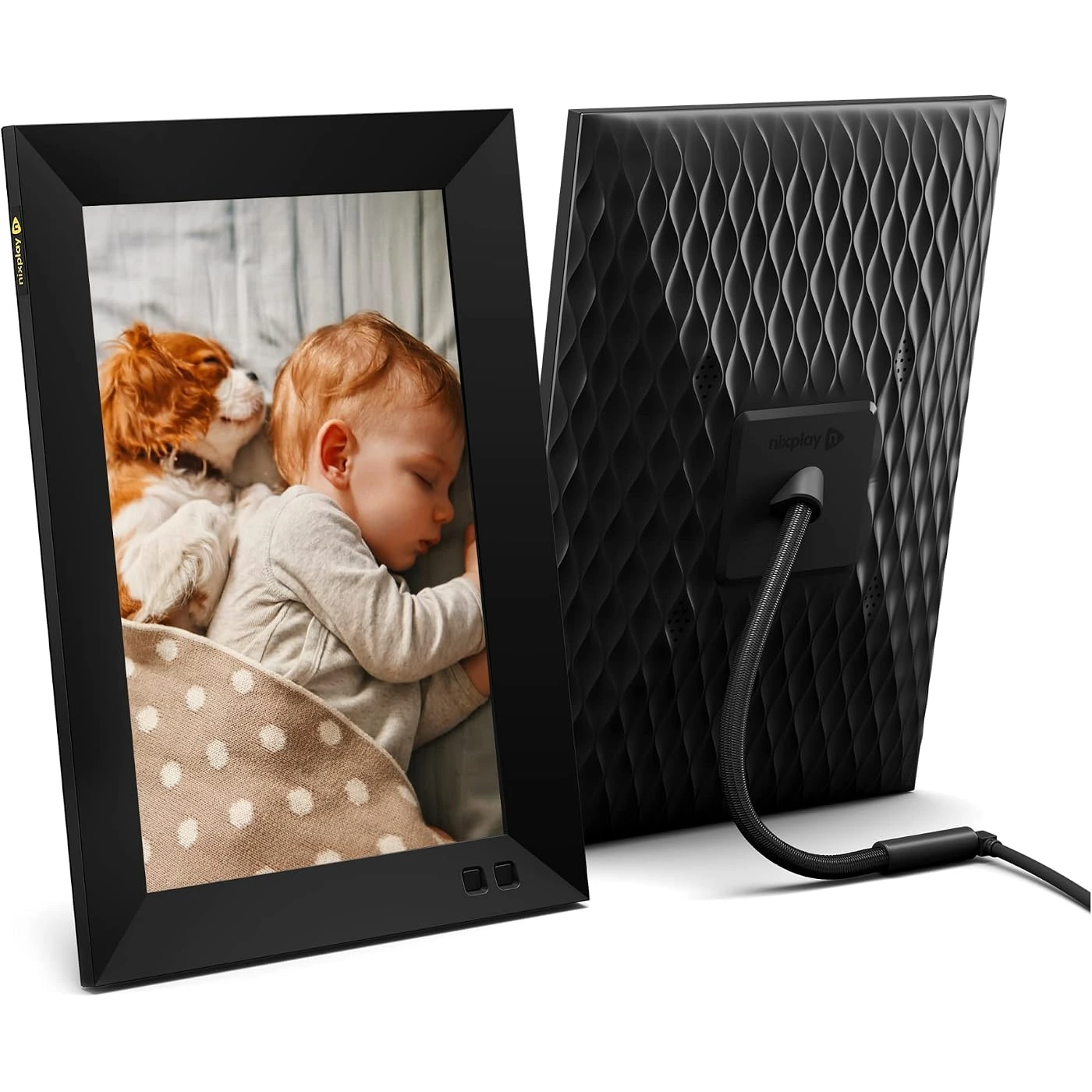
The Nixplay 10.1: 1280×800 IPS touchscreen with app, email and web photo sharing.
If the app experience matters most to you – and for a frame whose whole job is receiving photos, it should – the Nixplay 10.1 is the strongest contender here. The 10.1-inch 1280×800 IPS touchscreen has wide viewing angles and good color, and the Nixplay app for iOS and Android is consistently called out by owners as very easy to use for maintaining photo collections. Photos can also arrive by email or web upload, and the frame supports Alexa and Google Assistant voice control, a genuinely useful touch for someone who would rather speak than swipe.
Setup takes under five minutes: connect to WiFi, follow the on-screen steps, and family members can be invited to contribute remotely. Nixplay also lets you preload photos and a personal message before gifting, so the frame works the moment it is plugged in. The touchscreen makes on-frame navigation intuitive, and auto-rotate handles portrait and landscape photos gracefully.
Now the honest part that no roundup should skip: Nixplay’s free tier is thin. Free accounts get just 500MB of photo cloud storage and 500MB of video, 15-second video clips, up to 5 frames and one shared album – and in 2025 Nixplay controversially cut free storage from 10GB to 500MB, which frustrated long-time users. Nixplay Plus at $29.99 a year unlocks unlimited photo storage, 50GB of video, 2-minute clips, up to 10 frames and Google Photos sync (Nixplay’s own plan comparison spells out the free-versus-paid split: https://www.nixplay.co.uk/pages/plan-compare?tab=nx-plus). For light family sharing the free tier works; for a frame that receives photos weekly from a big family, budget the Plus plan.
The other wrinkle is a real UX quirk flagged by reviewers: the app separates “photo albums” from “photo playlists” with little explanation of the difference, which confuses first-timers. A minority of owners also report occasional WiFi or sync hiccups. And like all touchscreens here, photos that do not match the frame’s ratio get cropped – the in-app crop controls fix it, but it is one more step.
Pros:
- Best-in-class app experience with app, email and web uploads
- Alexa and Google Assistant voice control
- 1280×800 IPS touchscreen with wide viewing angles
- Preload photos and a message before gifting
- Under-5-minute setup with remote family invites
- Regular deal pricing brings it well under its typical range
Cons:
- Free cloud storage is only 500MB – heavy users need Plus at $29.99/year
- App splits “albums” and “playlists” confusingly
- Occasional WiFi or sync hiccups reported by owners
- Non-matching photos need manual cropping
Best for: Tech-comfortable families who will manage the frame from the app and want the slickest remote-sharing experience in the category.
Skip if: You want zero subscriptions and zero storage math – the Aura frames above are free and unlimited forever.
3. Skylight Frame 10-inch – Easiest Setup for Grandparents
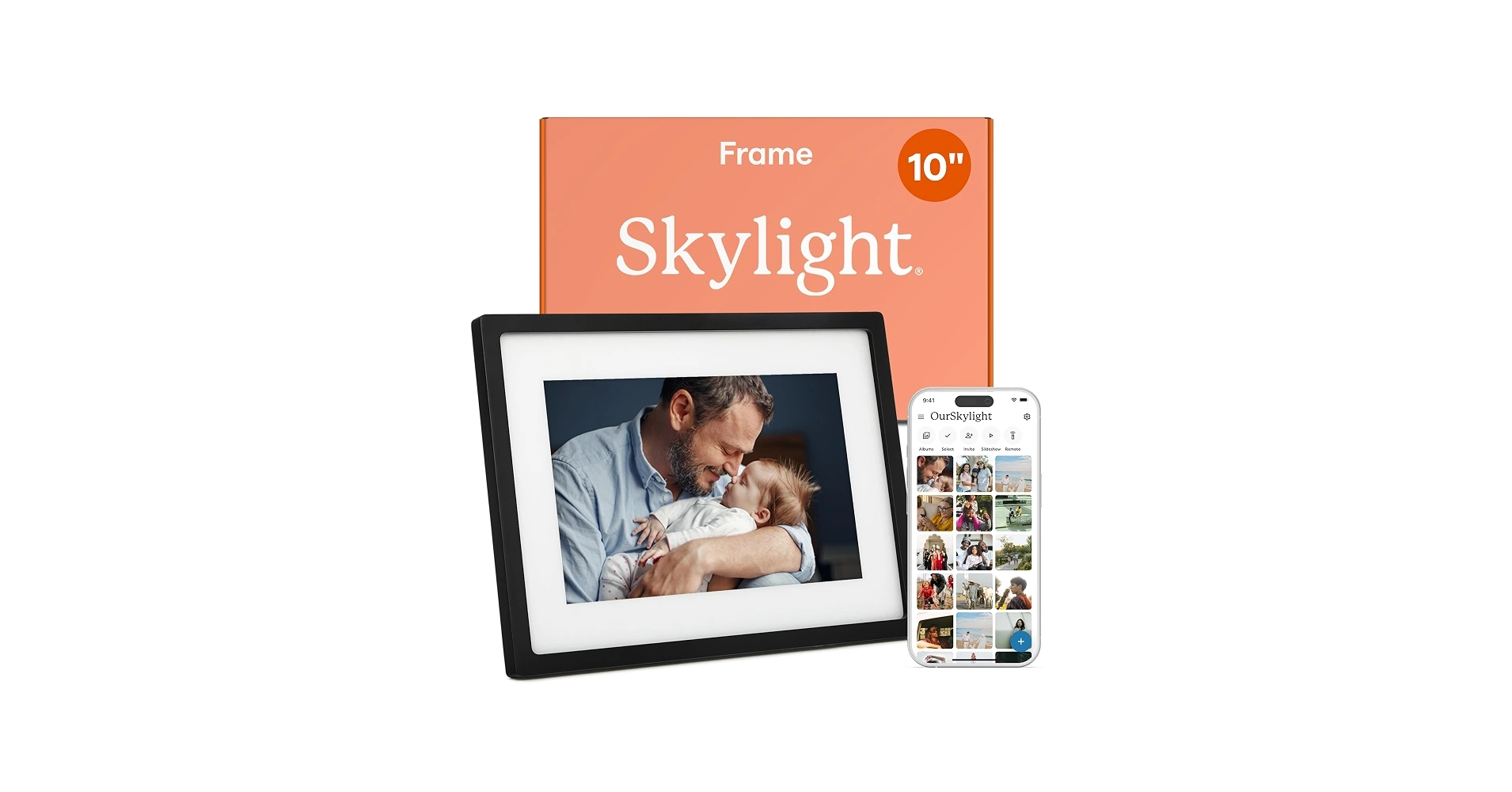
The Skylight Frame 10-inch: 1280×800 touchscreen, unique email address, and 8GB internal storage.
The Skylight Frame wins a very specific contest: the frame a grandparent can actually start using on their own. The killer feature is not on the spec sheet – every frame gets its own unique email address, so anyone in the family can send photos by plain email with no app, no account and no learning curve. Plug it in, tap the touchscreen to join WiFi, pick an email address, and done. Reviewers consistently call it the easiest frame for non-tech-savvy seniors, and it is easy to see why: the recipient never has to install or learn anything.
The 10-inch 1280×800 touchscreen is bright and responsive, the touchscreen keeps navigation simple, and 8GB of internal storage holds over 8,000 photos – plenty for a lifetime of family memories without touching the cloud. Gift Mode lets you preload photos before wrapping, so the frame greets its new owner with family faces instead of a setup screen. Photos arrive within seconds of being emailed, and the frame keeps playing its slideshow even if the WiFi drops.
The subscription situation needs an honest paragraph, because Skylight is where buyers get confused. The frame works with no subscription: sending and displaying still photos by email or app is free. Skylight Plus at $39 a year per frame unlocks video sending and playback, captions on photos, cloud backup and restore, albums and web-app management. Some buyers have complained – including angry Trustpilot reviews – that they felt nudged toward paying; the fair statement is that still photos are free forever, and the Plus features are genuinely optional. Skylight’s official product page lays out the free-versus-paid split (https://myskylight.com/frame).
The other honest notes: the resolution is modest next to a modern phone screen, so photos look good rather than stunning. And there is some confusing branding in the wild between the classic frame and the newer Frame 2, so buy the listing you actually read about.
Pros:
- Easiest setup in the category – plug in, tap, pick an email address
- Anyone can send photos by plain email – no app or account needed
- Still photos are free forever, no subscription required
- 8GB internal storage holds 8,000+ photos
- Gift Mode preloads photos before you wrap it
- Keeps playing from local storage if WiFi drops
Cons:
- Videos, captions and cloud backup need Skylight Plus at $39/year per frame
- 1280×800 resolution is modest next to modern phones
- Some buyers report confusing subscription messaging
- Branding between the classic frame and Frame 2 can confuse shoppers
Best for: Buying for grandparents or anyone who will not install an app – the email-to-frame system removes every technical barrier.
Skip if: You want video messages or a sharper display – the Aura Carver or the AKImart Frameo pick handle video without extra fees.
4. AKImart 10.1-inch WiFi Digital Picture Frame – Best Budget Pick
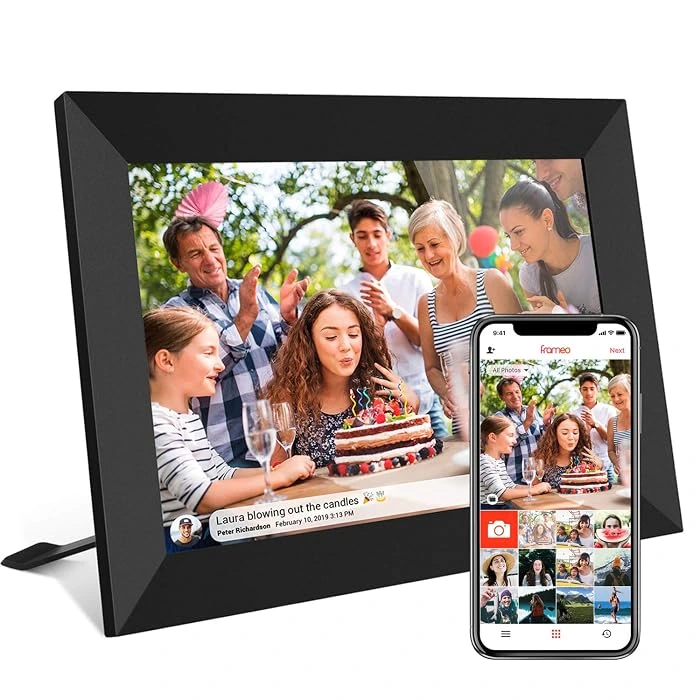
The AKImart 10.1: 1280×800 IPS touchscreen running the free Frameo app, with 32GB of storage.
Here is the secret the premium brands do not advertise: the Frameo app is free, excellent, and runs on affordable hardware like this AKImart 10.1. Frameo is an app platform – the hardware comes from many brands – and the pairing system is the most frictionless in the budget category: install the free Frameo app, scan the QR code on the frame, and family members can send photos and videos from anywhere in the world in seconds. After setup, as one Frameo partner puts it, there is no app, account or password for your loved one to manage.
The AKImart unit itself is a proper 10.1-inch 1280×800 IPS touchscreen with auto-rotate, wall-mountable, and 32GB of internal storage – enough for tens of thousands of photos. On the free tier, videos are capped at 15 seconds and you can send up to 10 photos per batch, which is plenty for daily family sharing. Optional paid tiers exist (Frameo+ at $1.99 a month for 2-minute videos and cloud backup), but they are genuinely optional – normal family use costs nothing. The frame continues its slideshow from local storage if the WiFi drops.
Why AKImart specifically? It is a current Amazon’s Choice listing with a 4.4-star average from hundreds of reviews and hundreds of recent purchases – the kind of proven, in-stock budget pick that random no-name frames are not. Owners praise the vivid colors and the sheer ease of remote sharing; the common complaint is that brightness lags the premium brands and the generic frame design will not win design awards. At around $80 – and sometimes dipping toward $60 on sale – it delivers 80 percent of the Aura experience for a quarter of the price.
The honest limits: brightness is a step below Aura and Nixplay, so it looks best out of direct sunlight. The 15-second free video cap is short for longer messages (paid Frameo+ extends it). And there is no official standalone brand site for the hardware – it is an Amazon marketplace brand – so buy from a well-reviewed listing and check the return window.
Pros:
- Around $80 – by far the cheapest way to get great remote sharing
- Frameo app is free forever and superbly easy for families
- 10.1-inch 1280×800 IPS touchscreen with auto-rotate
- 32GB internal storage – tens of thousands of photos
- Works offline from local storage after setup
- Proven listing: Amazon’s Choice with hundreds of owner reviews
Cons:
- Brightness trails the premium brands – avoid direct sunlight
- Free tier caps videos at 15 seconds and 10 photos per batch
- Generic frame design, no premium materials
- No official brand site – it is an Amazon marketplace brand
Best for: Budget gift-buyers who want the family-sharing magic without the premium price, and anyone buying multiple frames for several relatives.
Skip if: You want the sharpest display or a designer frame – the Aura Walden is worth the stretch.

Buying Guide: How to Choose a Digital Photo Frame
The wrong frame is the one that ends up in a closet, and it almost never ends up there because of the screen. It ends up there because the app confused everyone, the setup needed an IT degree, or a surprise subscription bill arrived. Five decisions keep you out of that trap.
Screen size and resolution: 10 inches is the sweet spot
For a shelf, nightstand or side table, 10.1 inches is the widely cited sweet spot – big enough to see faces clearly from a few feet away, small enough to fit anywhere. If the frame will sit across a living room or hang on a wall, step up to 15 inches like the Aura Walden: presence matters at distance. At 10 inches, 1280×800 is the resolution floor – anything below 720p looks blurry. All six picks here meet that floor, and the Aura frames add color calibration and anti-glare coatings that make photos look like prints rather than screens.
One ratio note: phone photos are tall, frames are wide. Aura’s 4:3 ratio on the Walden fits smartphone photos with the least cropping; 16:10 frames like the Nixplay crop more aggressively. Every frame here auto-rotates between portrait and landscape, and the Aura Carver’s Smart Portrait Pairing cleverly shows two vertical photos side by side instead of wasting half the screen.
App quality matters more than any spec
A digital frame’s real job is receiving photos, and the app is the inbox. Before you buy, check the companion app’s store rating and skim a few reviews – this is where the truth lives. Aura’s app is praised for speed and simplicity; Nixplay’s is the most feature-rich but splits albums and playlists confusingly; Frameo’s free app is the frictionless champion for multi-family sharing; Skylight sidesteps the app question entirely with its email-to-frame system.
The question to ask: how will YOUR family actually send photos? If everyone is on smartphones, any app works. If grandma’s sister only has email, Skylight’s unique-address system is the only answer. If half the family is iPhone and half is Android, confirm both apps exist – all six picks here support both platforms, and Aura adds iCloud and Google Photos sync for good measure.
Setup ease: do the work yourself before gifting
Setup itself is genuinely quick on every pick here – Aura and Skylight both advertise about a minute – but the consistent advice from grandparent-gift guides is blunt: do not make them set it up. Connect the frame to their WiFi yourself, pair the sharing app, preload a starter album of a few dozen photos, and tuck in a note that says new photos will appear automatically. A frame that arrives blank and asks for a WiFi password on a holiday morning ends up in a closet; a frame that arrives already showing the grandkids gets plugged in immediately.
Look for Gift Mode or preloading features – Aura, Nixplay and Skylight all offer them – and favor frames whose recipients never need an account. Skylight and Frameo are the leaders here: after setup, there is nothing for the recipient to manage at all.
Storage and subscriptions: the honest breakdown
This is the question every gift-buyer worries about, so here it is plainly. Aura charges nothing, ever – free unlimited photo and video storage on both the Walden and Carver. Dragon Touch charges nothing either, since photos live on its 32GB of local storage. Frameo’s core app is free forever, with an optional $1.99-a-month tier for longer videos and cloud backup that normal use does not need.
Nixplay and Skylight are the two with real paid tiers. Nixplay’s free tier covers 500MB of cloud storage and 15-second clips; heavy family sharing effectively wants Plus at $29.99 a year, which adds unlimited photos, 50GB of video and Google Photos sync. Skylight’s free tier covers still photos by email or app with no subscription at all; Plus at $39 a year per frame adds videos, captions, cloud backup and albums. None of these are traps if you know the split before you buy – which is exactly why we spell it out for every pick.
The gifting angle: make the first screen count
The difference between a frame that delights and a frame that confuses is the first screen. Preload 20 to 40 of your best family photos before you wrap it – the birthday smiles, the holiday chaos, the dog being ridiculous – so the recipient’s first experience is emotion, not menus. Invite the rest of the family to the sharing app or email address before the gift is opened, so new photos start arriving within hours. And skip the gift card comparison in your head: a frame that fills itself with grandchildren is personal in a way no store credit can match. For family movie nights, you can extend the theme with the best mini projector for home movie nights and turn the slideshow into a big-screen event.
5. Aura Carver 10.1-inch – Best Compact Premium

The Aura Carver: 10.1-inch calibrated display, free unlimited storage – Wirecutter’s pick.
The Aura Carver is Wirecutter’s pick for the best digital frame you can buy, and it is not hard to see why: it is the Aura experience – the praised app, the free unlimited storage, the no-subscription promise – in a 10.1-inch frame at around $149. The landscape 1280×800 display is calibrated for color and clarity and auto-adjusts to room lighting, so photos look like prints. Smart Portrait Pairing displays two vertical phone photos side by side, which is a genuinely clever fix for the tall-photo problem.
Everything that makes Aura the gift-buyer’s favorite carries over: setup in a minute or two, preload photos before gifting, family sends pictures by app, text, email, iCloud, Google Photos or web uploader, and unlimited free storage means nobody ever thinks about gigabytes. Thirty-second video clips play with sound through the built-in speaker, and Live Photos are supported. It is the frame reviewers name most often when asked what to buy a grandparent.
The honest trade-offs: as the older Aura model, the Carver connects on 2.4GHz WiFi only, which can complicate setup on routers that hide the 2.4GHz band behind a combined network name – worth knowing before you gift it to a house you will not be visiting. The 10.1-inch size is perfect for a shelf but will not fill a wall like the Walden. And at around $149 it costs nearly double the AKImart Frameo pick, though the unlimited storage and premium display justify it for many buyers.
Pros:
- Wirecutter’s pick – the most recommended frame in the category
- No subscription, free unlimited photo and video storage
- Calibrated display with auto brightness and color adjustment
- Smart Portrait Pairing shows two vertical photos side by side
- Preload photos before gifting; family sends from anywhere
- 30-second video clips with sound, Live Photos supported
Cons:
- 2.4GHz WiFi only – can complicate setup on modern routers
- Around $149 – nearly double the budget Frameo pick
- 10.1 inches will not fill a wall like the 15-inch Walden
- Older model – fewer hardware refinements than the Walden
Best for: Anyone who wants the Wirecutter-endorsed, no-subscription Aura experience in a shelf-sized frame at a mid-range price.
Skip if: The recipient’s WiFi setup is unknown and you cannot be there to help – or if you want the biggest possible display, in which case the Walden is the one.
6. Dragon Touch Classic 10 Digital Picture Frame – Best Large-Screen Value

The Dragon Touch Classic 10: 10.1-inch 1280×800 IPS touchscreen, 32GB storage, no subscription.
The Dragon Touch Classic 10 is the value play for buyers who want a full-size 10.1-inch touchscreen without paying for a cloud ecosystem. The 1280×800 IPS touchscreen is sharp and responsive, auto-rotate handles portrait and landscape, and it wall-mounts if you want it off the shelf. Photos arrive through the free OurPhoto app, by email to the frame’s unique address, or the old-fashioned way: SD card and USB drive, which makes it one of the few frames here that works perfectly with zero internet at all.
The value story is the storage: the current listing packs 32GB of internal storage – Dragon Touch claims room for around 80,000 photos – with SD and USB expansion on top. No subscription exists because there is no cloud plan to sell; what you buy is what you get. Around $50 to $70 (it has dipped near $45 on sale), it is the cheapest 10-inch touchscreen here by a clear margin. A built-in speaker, motion sensor that wakes the frame when someone approaches, customizable sleep schedules and a magnetic stand round out a surprisingly complete package.
The honest trade-offs: the sharing software is the weak link. Reviewers note the OurPhoto app is mainly an email-sending tool rather than a real frame manager, the email process is slow and limits volume, and some units have shipped without a frame ID printed on them (support replaced them, but check yours on arrival). WiFi is 2.4GHz only. And while the screen is good, it does not match the color calibration of the Aura displays. This is the pick for someone comfortable loading photos themselves – less ideal as a surprise gift for a non-tech-savvy recipient who will rely on family sending photos remotely.
Pros:
- Around $50-70 – the cheapest 10-inch touchscreen on this list
- 32GB internal storage plus SD card and USB expansion
- No subscription, no cloud – works fully offline
- Motion sensor wakes the frame when someone approaches
- Built-in speaker, sleep schedules, magnetic stand
- Wall-mountable
Cons:
- OurPhoto app is clunky – mainly an email-sending tool
- Email photo delivery is slow with volume limits
- 2.4GHz WiFi only
- Display quality trails the calibrated Aura screens
Best for: Budget buyers who want a big touchscreen and will load photos via SD card or USB themselves, and anyone who wants zero cloud dependency.
Skip if: Remote family photo sharing is the whole point – the Frameo and Skylight picks handle that far more gracefully.
Frequently Asked Questions
Do digital photo frames need WiFi?
Not strictly. Any frame can display photos stored on its internal memory, SD card or USB drive with no WiFi at all – the Dragon Touch Classic 10 works perfectly this way. WiFi is only needed to receive new photos remotely through an app, email or cloud service. Once photos are downloaded, they keep displaying even if the internet drops; frames like the Skylight and the AKImart Frameo pick continue their slideshow from local storage during an outage and simply cannot receive new photos until reconnected.
Do digital photo frames require a subscription?
No – not as a rule. Aura charges no subscription ever, with free unlimited photo and video storage. The Frameo app’s core sharing is free forever, with an optional $1.99-a-month tier for longer videos and cloud backup. Skylight works without its $39-a-year Plus plan for still photos. Nixplay’s free tier works but is limited to 500MB of cloud storage, with Plus at $29.99 a year for unlimited photos. Always check the brand’s plan page before buying so the free-versus-paid split is clear.
Can family members send photos to the frame remotely?
Yes – that is the main selling point of WiFi frames. With Aura, family sends photos by app, text message, email, iCloud, Google Photos or a web uploader. With Skylight, anyone emails photos to the frame’s unique email address with no account needed. With Frameo, family members install the free app and send from anywhere in the world in seconds. Nixplay and Dragon Touch support app and email uploads too. Invite the whole family and the frame fills itself.
Will the frame work with both iPhone and Android?
Yes. All six picks here offer both iOS and Android apps, so mixed-device families can all contribute photos. Aura additionally syncs directly with iCloud and Google Photos, which covers households that span both ecosystems. Skylight’s email-to-frame system sidesteps the question entirely – if a relative can send an email, they can send a photo.
What size digital photo frame is best for grandparents?
10.1 inches is the widely cited sweet spot for a nightstand, shelf or side table – big enough to see faces clearly from a few feet away. Go 15 inches, like the Aura Walden, if the frame will sit across a living room or be wall-mounted. Resolution matters at these sizes: at 10 inches, 1280×800 is the floor for photos that look sharp rather than blurry, and all six picks here meet it.
Can a grandparent set up a digital frame alone?
Most owners say: do not make them. Setup itself is genuinely quick – Aura and Skylight both advertise about a minute – but the consistent advice from grandparent-gift guides is to pre-set everything yourself: connect the frame to their WiFi, pair the sharing app, preload a starter album of a few dozen photos, and include a note saying new photos appear automatically. A frame that arrives blank and asks for a WiFi password on a holiday morning ends up in a closet; a frame that arrives already showing the grandkids gets plugged in immediately.
Do digital frames keep working if the WiFi drops?
For displaying what is already on them, yes. Frames with local storage – the Skylight, the AKImart Frameo pick, the Nixplay and the Dragon Touch – continue their slideshow from internal memory during an outage; they just cannot receive new photos until reconnected. Aura frames are more cloud-dependent: new content requires WiFi, though photos already loaded persist. If the recipient’s internet is unreliable, favor a frame with generous local storage like the Skylight’s 8GB or the Dragon Touch’s 32GB.
Final Verdict: Which Digital Photo Frame Should You Buy?
If you want our single top recommendation, it is the Aura Walden 15-inch. The 15-inch calibrated display has real presence, the sharing system is the best in the category, and the no-subscription-ever promise with free unlimited storage means the gift never comes with a bill. At around $299 it is an investment, but it is the frame most likely to still be delighting its owner years from now.
For a shelf-sized frame, the Aura Carver at around $149 keeps the same beloved ecosystem in a 10.1-inch body – Wirecutter’s pick for a reason. If the recipient is a grandparent who will not install apps, the Skylight Frame at around $150 wins on pure simplicity with its email-to-frame system. The Nixplay 10.1 at around $165 is the choice for app lovers who want the slickest remote-sharing experience – just budget the $29.99-a-year Plus plan if the family shares heavily. The AKImart 10.1 at around $80 is the smart budget pick: the free Frameo app delivers 80 percent of the premium experience for a fraction of the price. And the Dragon Touch Classic 10 at around $60 is the no-cloud, no-subscription value play with a whopping 32GB of local storage.
Whichever you choose, the gifting rules matter more than the brand: preload 20 to 40 of your best photos before you wrap it, connect the WiFi yourself, and invite the family to the sharing app before the gift is opened. Do that, and you are not giving a gadget – you are giving grandparents their grandkids, every single day.
Sharing memories does not stop at the shelf. For family movie nights, turn the slideshow into a big-screen event with the best mini projector for home movie nights, and keep your phone charged for all that photo-sending with the best portable chargers for phones and travel.